
Lightroom CC Local Copy 100GB more than Online Synced Storage - how to fix
Today I had to force shutdown my MacBook Pro while Lightroom was open (running the latest version of Lightroom CC, v4.2). On retsrat, it said the catalog was broken and needed to be redownloaded from the Cloud. No problem - except, very annoyingly, it then proceeded to re-download 100-200GB of photos to my local storage copy on my external hard drive, despite the fact that all these photos had previously been downloaded, before I force-restarted my Mac!
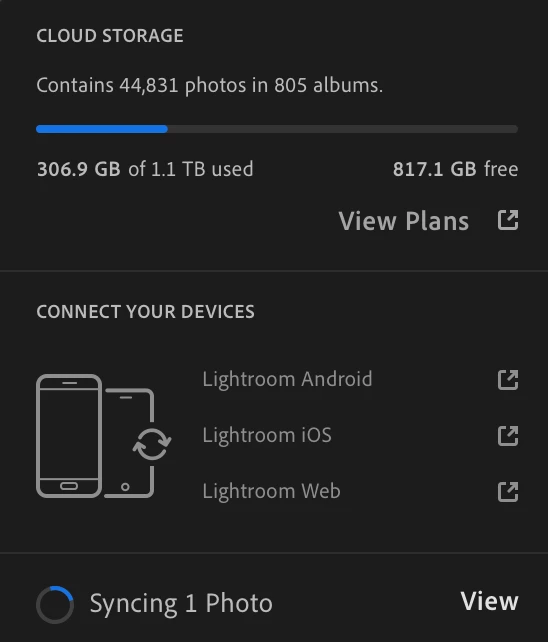
Now, in Lightroom, it says I've used 306.9GB of storage.
But on my local storage folder, it says 414GB. (screenshots below)
(Also - separate problem - there is 1 Photo perpetually syncing, but when I click "View," it says "No photos [syncing] were found.)
Any ideas how I can fix this? I'd rather not completely delete the local copy and start from scratch... that would be rather a waste of bandwidth.
From my experience, local storage seems to be a bit of an afterthought in Lightroom CC, which is unfortunate.
Thanks.



 AdChoices