Participant
September 8, 2018
Answered

Lightroom CC migrated catalog from LR 6, no photos available

  • September 8, 2018
  • 3 replies
  • 451 views

Hi,

I have just upgraded to LR CC from LR 6. I've followed the instructions to migrate the old catalog. I had to change the storage location to my internal storage drive as my ssd did not have enough capacity. This all seemed fine, however there are zero photos showing in the catalog? Any ideas?
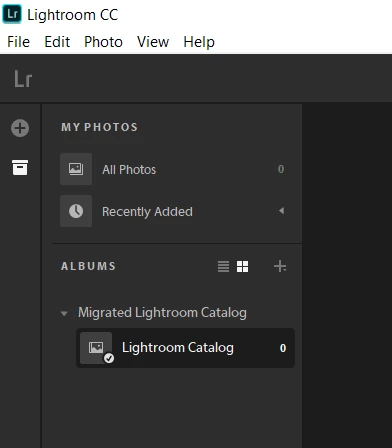
    This topic has been closed for replies.
    Correct answer Akash Sharma

    Hi murrayf17175345,

    Lightroom CC needs a catalog upgraded to Lightroom Classic CC to migrate the data.

    As JimHess has mentioned, you need to first upgrade your catalog to Lightroom Classic CC and then migrate it to Lightroom CC. Refer this article to know more about upgrading the catalog: How to create and manage catalogs in Photoshop Lightroom Classic CC

    Here's a link to Migrate photos and videos from Lightroom Classic CC to Lightroom CC

    Thanks,

    Akash

    3 replies

    Participant
    September 10, 2018

    Hello,

    I do not have Lightroom Classic cc, just me previous version, Lightroom 6 and now Lightroom cc. Is the no other way? thanks

    JP Hess
    Inspiring
    September 10, 2018

    You can install the trial version of Lightroom Classic CC (it's good for 7 days) and allow it to create a copy of your catalog that is compatible with Lightroom Classic CC. Then that new copy of the catalog could be migrated to the cloud version of Lightroom CC. However, there would be no possibility of synchronizing with Lightroom 6 in the future. You would have all the features available in Lightroom CC, but no connection with your desktop version of Lightroom. After you allow Lightroom Classic CC to convert the catalog, the program could be uninstalled and you could continue using Lightroom 6 with the catalog you are using now.

    Akash Sharma
    Akash SharmaCorrect answer
    Legend
    September 10, 2018

    Hi murrayf17175345,

    Lightroom CC needs a catalog upgraded to Lightroom Classic CC to migrate the data.

    As JimHess has mentioned, you need to first upgrade your catalog to Lightroom Classic CC and then migrate it to Lightroom CC. Refer this article to know more about upgrading the catalog: How to create and manage catalogs in Photoshop Lightroom Classic CC

    Here's a link to Migrate photos and videos from Lightroom Classic CC to Lightroom CC

    Thanks,

    Akash

    JP Hess
    Inspiring
    September 8, 2018

    As far as I am aware, it is only possible to migrate a catalog from Lightroom Classic CC. Lightroom 6 is not Lightroom Classic CC.