
Inspiring
June 4, 2019
Answered

Lightroom CC - shared folder sort order vs custom order

  • June 4, 2019
  • 1 reply
  • 1317 views

I have an album in Lightroom CC I have shared. It's now online and available to others.

2018 Haight Street Fair

I am unhappy with the sort order, and I would like to move a couple of the photos around. Given that this has a slideshow option, I assume there must be a way to rearrange the photos, right?

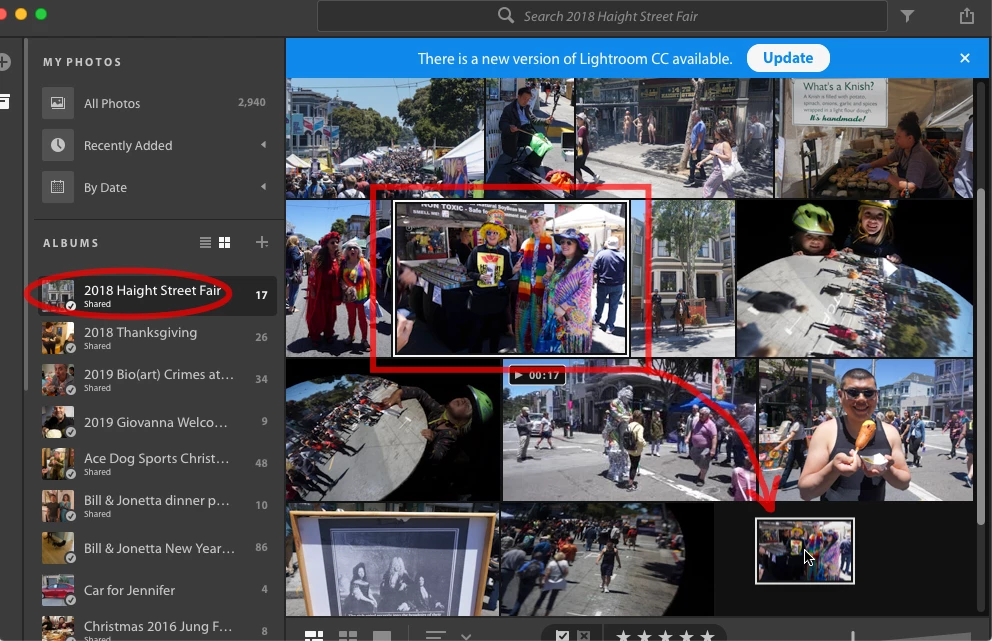
However, when I try to drag and drop them in the UI of the app, I can't move them. Like, here's me trying to move a photo to the end of the pile, but it won't budge.

This topic has been closed for replies.
Correct answer 99jon

Go to the album in your web app and click the display tab - bottom left (see image below)

Sign in here:

https://lightroom.adobe.com/

You should be able to drag images into your preferred order. You can also click between rows to segment and add text to tell a story. See this example I made earlier.

https://adobe.ly/2zdFqSF

1 reply

99jon
99jonCorrect answer
Legend
June 4, 2019

Go to the album in your web app and click the display tab - bottom left (see image below)

Sign in here:

https://lightroom.adobe.com/

You should be able to drag images into your preferred order. You can also click between rows to segment and add text to tell a story. See this example I made earlier.

https://adobe.ly/2zdFqSF

redtimmyAuthor
Inspiring
June 5, 2019

Wow, this is exactly the right answer. I had no idea this web tool even existed. Thank you!