

Tea_4
Participant
February 25, 2026
Question

Lightroom cloud constantly synchronizing

  • February 25, 2026
  • 1 reply
  • 38 views

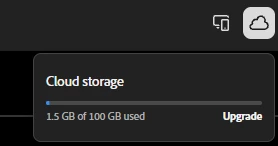
Hello, I am having problems with Lightroom mobile. My cloud is constantly synchronizing on mobile app (iOS) - not having any sync issues listed and having more than enough cloud storage. Also when I am editing on web/desktop version my edits will not save, I am guessing that is because of the bugged syncing. I am signed in on both devices with the same Adobe account. I tried logging out both from mobile app, web and desktop version as well as reinstalling the app so I am sure it is up to date which solved the 4 pending photos to sync I had, but when I tried editing a photo again the same issue occurred - I am still not able to save my edits and it is constantly synchronizing. Can this be solved?

 

Regards,

Tea

    1 reply

    Inspiring
    February 25, 2026

    I see you tried reinstalling the app.  

    If you sign into your same account in the LR Web app at https://lightroom.adobe.com , do you see anything in “Sync Issues?”  If you do, confirm you have the original image safely stored outside of Lightroom and then remove the bad file.  Does that help?  

    Alternatively, if you do have one or more files with “Sync Issues,” you could place them in an album, and if you are will to share that with us by sending me a private message, the team can analyze the data/failure.   

    Do let us know if you have images or videos found in “Sync issues”

    Tea_4
    Tea_4Author
    Participant
    February 26, 2026

    There is nothing in “sync issues”.