
Participant
September 23, 2025
Answered

Lightroom Cloud Lightroom Classic

  • September 23, 2025
  • 1 reply
  • 94 views

Hello Everyone, 


A very silly question here, I purchased Lightroom and I figured that I had purchased Classic, but it seems like I may have purchased Cloud. Would y'all share with me how to change? Thank you so much. I did see a (switch plans) button but it seemed like I was cancelling for the same exact thing? There's little distinction.
Correct answer Rob_Cullen

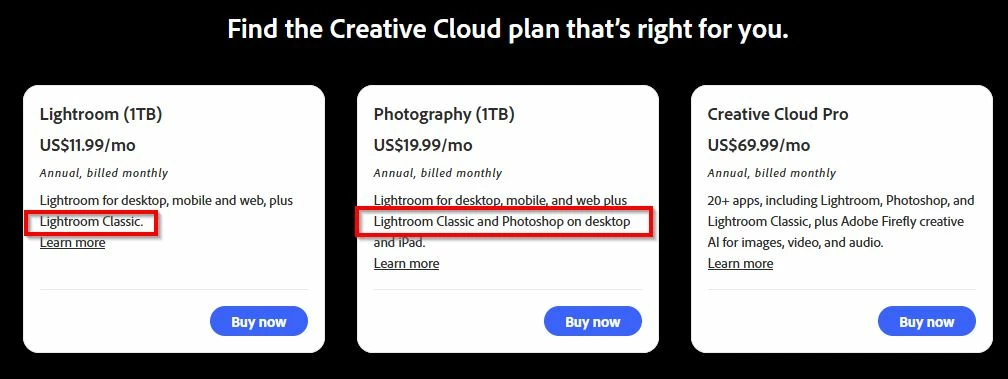
If you purchased a "Lightroom Plan" recently  FROM ADOBE, then you plan will include both Lightroom and Lightroom-Classic.

Open the Adobe Creative Cloud Desktop App, click on the [Apps] icon, and scroll down to install Lightroom-Classic.

If you purchased from Apple Store or Google, then your plan may only contain the 'Mobile' apps ie. 'Lightroom'.  

You will need help to determine which plan you have purchased. (I am not knowing.)


1 reply

Rob_Cullen
Community Expert
Rob_CullenCommunity ExpertCorrect answer
Community Expert
September 23, 2025

If you purchased a "Lightroom Plan" recently  FROM ADOBE, then you plan will include both Lightroom and Lightroom-Classic.

Open the Adobe Creative Cloud Desktop App, click on the [Apps] icon, and scroll down to install Lightroom-Classic.

If you purchased from Apple Store or Google, then your plan may only contain the 'Mobile' apps ie. 'Lightroom'.  

You will need help to determine which plan you have purchased. (I am not knowing.)


Regards. My System: Windows-11, Lightroom-Classic 15.1.1, Photoshop 27.3.1, ACR 18.1.1, Lightroom 9.0, Lr-iOS 10.4.0, Bridge 16.0.2 .