
Known Participant
April 24, 2026
Question

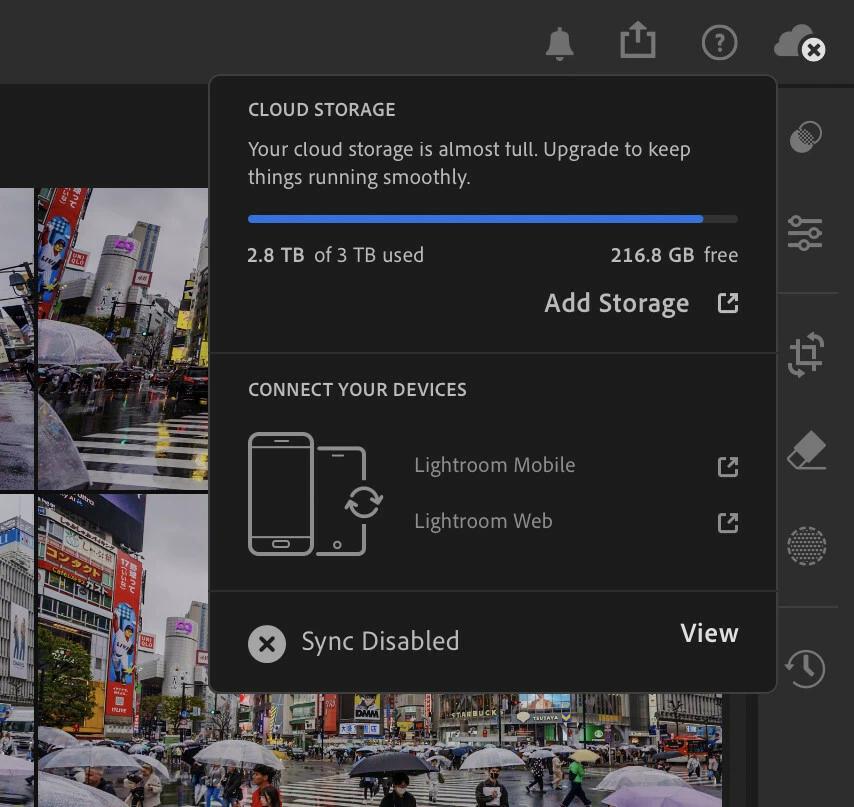
Lightroom desktop is stuck in a "Sync Disabled" state
  • April 24, 2026
  • 1 reply
  • 24 views
The sync popup shows the sync being disabled even though I have enough storage left

Lightroom is currently unusable for me. It won’t sync files from the cloud locally or local files to the cloud. It’s like if the backend just didn’t exist. 

I tried fixing this issue by doing the following steps:

  1. Delete more photos
  2. Delete permanently all photos in the “Deleted” folder
  3. Uninstall (removed all settings) and re-install Lightroom
  4. Set star rating on the photos that are not settings
  5. Edited some photos that are not syncing
  6. Edited photos on other devices to force a sync to happen
  7. Imported new photos
  8. Pause/Un-paused the syncing manually

Syncing in the Creative Cloud app is working fine.

    1 reply

    lba294Author
    Known Participant
    April 24, 2026

    I don’t want this to be considered solved, because it’s a pretty big issue but I deleted the “Lightroom Library.lrlibrary” to “old_Lightroom Library.lrlibrary” which forced the library repopulate. Once this was done, Lightroom seems to work again. I lost a few hundred edits but the files are all present.

    Sameer K
    Community Manager
    Community Manager
    April 24, 2026

    Hey, ​@lba294. Welcome to the Lightroom Community. You’ve already did the nuclear step to recreate the entire database. It’ll be difficult to investigate this.


    If the issue appears again, we can use the diagnostic report to learn more about this. In Lightroom, go to Preferences  > Account tab > Press and hold the ALT/OPT Key to generate a Diagnostic report. Upload the report to any cloud file-sharing service, share the link here, or send it to me directly from my profile. 


    Also, share the system info from Lightroom from Help > System info > Copy and paste into a text document > Upload and attach here when you share the logs. 


    Thanks!
    Sameer K

    lba294Author
    Known Participant
    April 24, 2026

    Hello ​@Sameer K, thanks for the quick answer! I only renamed the library so I could access it by renaming the new file. I was able to get the requested logs and system information and sent it to you. Please let me know if you need anything else.