Known Participant
May 29, 2024
Question

Lightroom is missing some important files

  • May 29, 2024
  • 4 replies
  • 1383 views

I got this popup windows prior to every Lightroom launch since last update. Tested on two different computers.
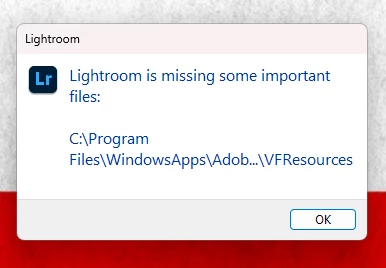
System info file attached.

This topic has been closed for replies.

4 replies

Adobe Employee
June 9, 2024

Hi, @Cicuryn10499771, you might install Lightroom CC through the Microsoft Store. Please uninstall Lightroom from your Computer and reinstall Lightroom CC through the Creative Cloud application. 

Known Participant
June 9, 2024

Thank you, but I prefer MS Store version exactly for the absence of Creative Cloud bloatware.

Rob_Cullen
Community Expert
Community Expert
June 7, 2024

@Cicuryn21521958 It looks strange in your Application folder!  Might be the cause of the error message.


My Systom Info report shows:
Application Folder: C:\Program Files\Adobe\Adobe Lightroom CC
Settings Folder: C:\Users\Robert\AppData\Roaming\Adobe\Lightroom CC
Library Folder: C:\Users\Robert\AppData\Local\Adobe\Lightroom CC\Data


Regards. My System: Windows-11, Lightroom-Classic 15.1.1, Photoshop 27.3.1, ACR 18.1.1, Lightroom 9.0, Lr-iOS 10.4.0, Bridge 16.0.2 .
Participant
June 6, 2024

Anyone get a solution to this?  I started getting this on/about June 1, 2024.

Participant
June 1, 2024

I have the same pop up, have not figured out what is wrong... it seems to be working fine so far, but I would like to know why I get the message and what it affects...