


Lightroom Library.lrlibrary size doesn't match Cache preferences breakdown - ~30GB unaccounted for
I'm using Lightroom (desktop, cloud-based - not Classic) on macOS and have run into a persistent discrepancy between what Finder reports for my Lightroom Library.lrlibrary package and what the Cache preferences screen shows.
Current numbers:
- Finder reports the package at 54.81GB

- Preferences > Cache shows only 22.2GB total (App & user data: 21.8GB, Photo cache: 0.4GB)
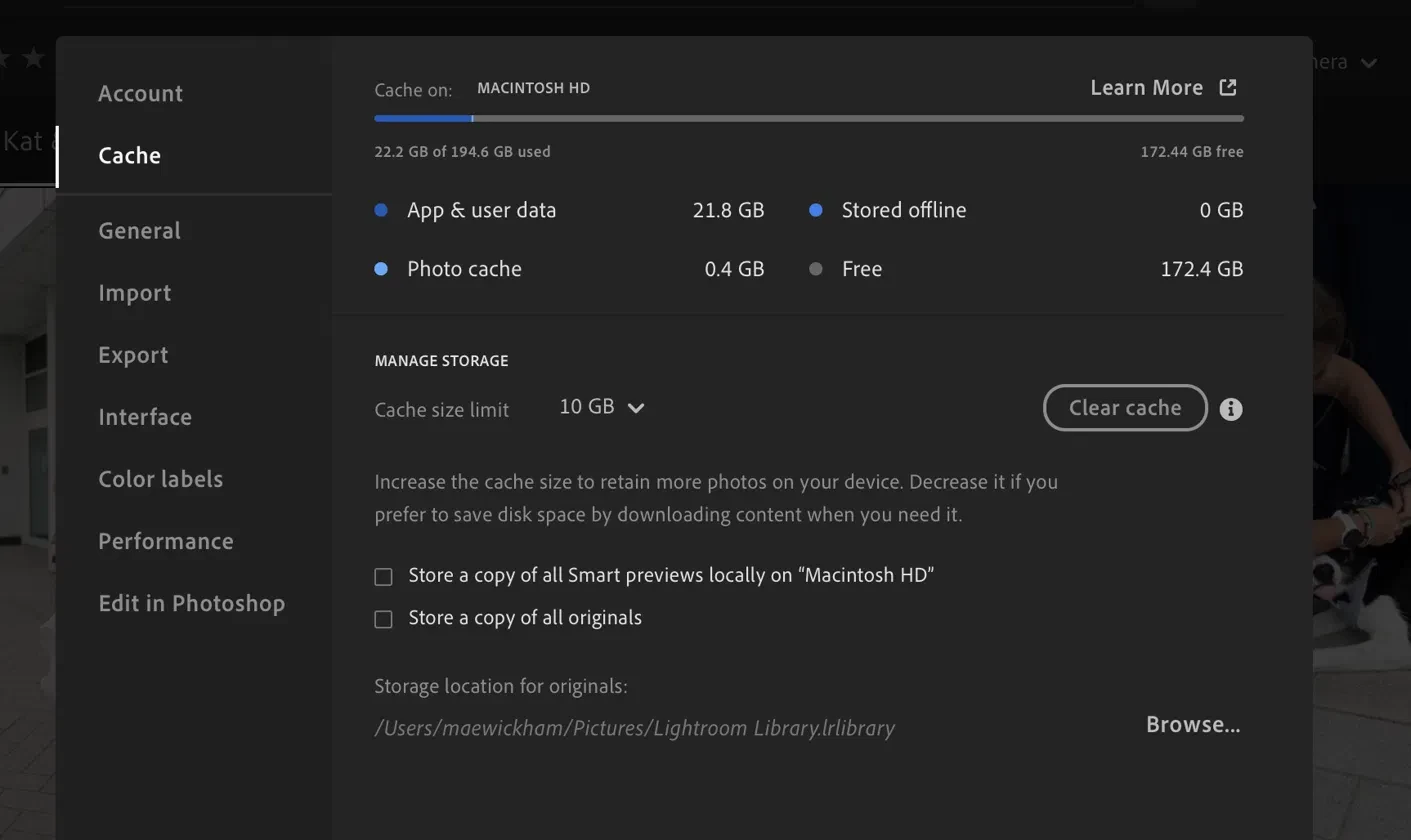
- That leaves roughly 32GB unaccounted for
What I've already tried, with the effect on the Finder size:
- Clicked Clear Cache: package dropped from ~90GB to 55.64GB (Photo cache went from 32.1GB to 0.4GB, so this part behaved as expected)
- Emptied 6,977 images from the Deleted folder: package dropped from 55.64GB to 54.81GB (only ~0.83GB, far less than I expected given the number of images)
- Lowered the Cache size limit from 110GB to 10GB: App & user data barely moved (22.6GB to 21.8GB), and the Finder size didn't change
So the ~30GB gap has stayed constant through all of these steps. Neither Photo cache adjustments nor clearing the Deleted folder seem to touch it, and App & user data doesn't account for it either.
My question: what else lives inside the .lrlibrary package that wouldn't show up in the Cache preferences breakdown? I've seen mentions in older threads of a "temporaryedits" folder inside the package taking up significant space separately from the "originals" folder - is this still a thing, and if so, is it safe to clear, or is there a supported way to do so?
Any help identifying what's actually taking up this space would be appreciated. Happy to provide more details or screenshots if useful.
 AdChoices