
Participant
October 29, 2024
Answered

Lightroom low quality

  • October 29, 2024
  • 2 replies
  • 940 views

Hello,


I’m reaching out because recently, the photos I import into Lightroom appear in very low quality. The image looks fine at first glance, but when I zoom in a bit, there are no details visible; everything is pixelated. However, on my computer/camera, I can zoom in a lot while maintaining perfect quality.


This issue prevents me from cropping my images, which is quite frustrating when I see the final result after exporting.


I hope someone has experienced the same problem and that there’s a way to resolve it.


Thank you!

Have a great day!
This topic has been closed for replies.
Correct answer Charlie.D

Hello @Ananda.b 


By default, Lightroom Mobile only downloads "smart preview" images from the cloud.  These are downsampled copies of your original that take less space.  For any image you want to edit at full resolution, tap on the cloud icon and choose "Get this original."  Or briefly pinch to zoom in *before* you go into crop -- this will also pull the original image from cloud storage.


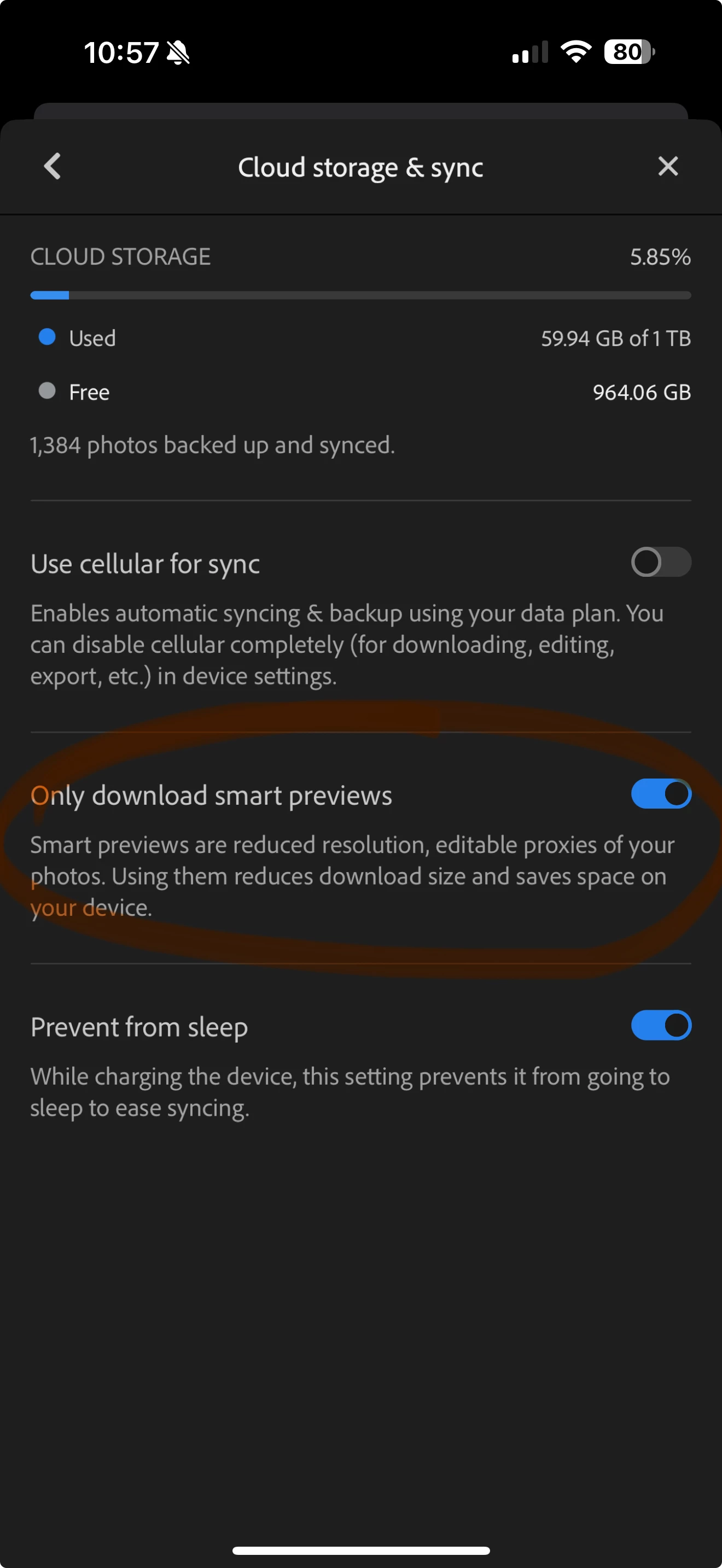
If you don't want to have to manually download every original image, in app settings you can choose to always download originals for editing.  To do this, disable in LR App Settings > Cloud Storage & Sync > "Only download smart previews?"  

Just know that always downloading originals will grow your app cache faster, taking more local storage that using smart previews by default.  

2 replies

Charlie.DCommunity ManagerCorrect answer
Community Manager
October 29, 2024

Hello @Ananda.b 


By default, Lightroom Mobile only downloads "smart preview" images from the cloud.  These are downsampled copies of your original that take less space.  For any image you want to edit at full resolution, tap on the cloud icon and choose "Get this original."  Or briefly pinch to zoom in *before* you go into crop -- this will also pull the original image from cloud storage.


If you don't want to have to manually download every original image, in app settings you can choose to always download originals for editing.  To do this, disable in LR App Settings > Cloud Storage & Sync > "Only download smart previews?"  

Just know that always downloading originals will grow your app cache faster, taking more local storage that using smart previews by default.  

Ananda.bAuthor
Participant
October 29, 2024

Thanks u so much ♥️

Ananda.bAuthor
Participant
October 29, 2024

Bonjour,


je vous contacte car dernièrement les photos que j'importe sur Lightroom sont vraiment en basse qualité. 
La photo a l'air bien à première vue, mais quand on zoome un peu on ne voit plus aucun détail, tout est pixelisé. 
Pourtant sur mon ordi/appareil photo je peux zoomer énormément tout en gardant une qualité parfaite. 
Cela m'empêche donc de croper mes images, et c'est assez frustrant quand je vois le résultat final une fois exporté..

En esperant que quelqu'un ai eu le même problème et qu'il y ai une façon de le régler.

merci ! 
Bonne journée ! 


[duplicate posts merged by Moderator]