


murky-brew
Participating Frequently
October 7, 2018
Question

Lightroom - Missing Edit Settings

  • October 7, 2018
  • 9 replies
  • 12512 views

I edit my photos on both desktop and mobile versions of Lightroom CC, often starting on my iPad and finishing once I get back to my Mac.


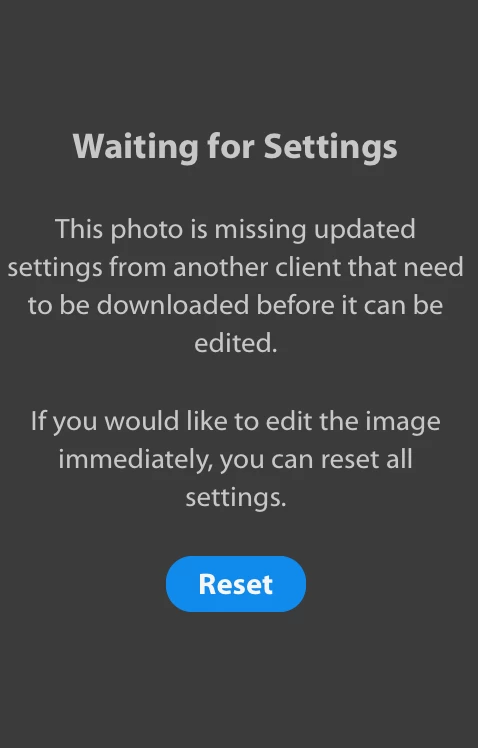
For a past few months I've been having issues with edit settings not reliably synching between the two. When I open a previously edited photo on the Mac, it would often be displayed in original form with no settings applied and once I switch to edit mode I would get an Waiting for Settings error in the side panel. The photo will be stuck like this until i find the same photo on the iPad and change something in order to force edit settings to sync. This helps for a bit but again it's not reliable: while I'm editing a photo on the Mac it can randomly go in to Waiting for Settings mode while I'm still editing it and essentially lock me out of this photo until I fix it though the iOS app. I lose any changes I just made on the Mac too. It would get stuck like this over and over until I give up.


All this makes it quite a pain to do anything in Lightroom CC. Has anyone else had this problem? What would be potential steps to fix it?


I'd really appreciate some help, thank you!
 

This topic has been closed for replies.

9 replies

Participant
January 14, 2023

I am having the same issue for the first time now. Surprising that this has been going on for years for some people...

Participating Frequently
January 14, 2023

I'm not surprised one bit. They do not care nor listen to their customer's complaints. It's awfully obvious,

I mean.. here we are on a thread that started nearly 4 years ago. I hope this coming year we (the loyal customers) will be provided with proper customer service that is informed on how these programs work and problem solving that actually accomplishes these ongoing issues. Adobe get a grip, it's 2023. 

Rikk Flohr_Photography
Community Manager
January 15, 2023

You’ve posted to a very old thread. It is highly unlikely that the issue described in this thread, though not impossible, is the same issue which you are currently experiencing. Rather than resurrect an old thread that is seemingly similar, you are better posting to a new thread with fresh, complete information including system information, a complete description of the problem and step-by-step instructions for reproduction. 


In the unlikely event the issue is the same, we will merge you back into the appropriate location. 


Thank you!


Rikk Flohr: Adobe Photography Org
Participant
November 25, 2022

I had this problem unexpectedly pop up yesterday for the first time. I left it overnight to see if it would sync, but nothing changed. I was fortunate to have already uploaded my photo before this had happened, since it reverted back to its original and unedited form once this error message popped up. I clicked the reset button to see what would happen and after doing so, all of the versions that I had saved popped back up. This was a scary move, and this is my one and only experience with this issue, but it did allow me to now see and continue to edit my photo. This is of course not professional advice and this is my only experience with this for me, but that is what happened for me. I hope this helps anyone that is willing to click that reset button! 

Participating Frequently
December 3, 2022

Clicking reset button (multiple times) does nothing. This is huge disappointment Adobe. I/we pay an awful lot for these products. Up your game ASAP. Lots of other options now

Participant
November 23, 2022

I also have this issue.  I'm using LR Classic, so not sure if this is applicable to all.  A work around similar to ianb81625466 which seems to work (sometimes!) for me is creating a virtual copy then resetting the original back to the starting point.  Then go to the virtual copy, and then back to the original and click previous.  It does usually seem to clear the issue.

Participant
November 14, 2022

Still having this issue with no resolve, and this is with both of the new updates. Has anyone found a solution? 

Participant
November 18, 2022

I had the same issue but have found a solution that worked for me.  Change the White balance temp setting away from As Shot to Custom by changing the temp setting by say 1. This then seems to force the settings to sync. Found the solution here (I have no connection with the website) https://shotkit.com/fix-lightroom-problems/ item 6. 

David.Focal
Participating Frequently
October 27, 2022

Does anyone know how to fix this, been having the issue for days, tech support are no help as they dont know what the issue is they say.

peter-b8062983
Adobe Employee
Adobe Employee
October 28, 2022

Assuming you have the same issue as original reported (unsynced Mac edits that are stuck), if you go back and select the "Reset" on your Mac here and make a new edit, you may be able to recover the original edit.  (That is, the "Reset" is not actually done as the changes are local)  We are seeing that this approach is working with some internal testing.   We are also looking at making changes to avoid this issue in the future.


There is not another workaround identified, so hoping this works for you.  Please let us know.


-Peter

Participating Frequently
November 13, 2022

That was incredibly vague, confusing and unhelpful. Both my Mac and iPad say all my edits are up to date synced with the green check mark on the cloud, nonetheless I am still getting that "Waiting for Settings" error.

For the price people are paying for these programs.. you would think after 4 years of multiple complaints that they would actually care to focus on fixing this issue that clearly hundreds of users have experienced throughout these years. Quite embarrassing. 

murky-brew
Participating Frequently
November 3, 2018

selondon​ When viewing the same photo on lightroom.abobe.com I get blank thumbnail/preview and the following error: Sync has not finished for file “DJI_0040.DNG”. Open Lightroom on MacBook Pro to continue syncing. Added on 5/23/18.

But when I go back to my Mac as instructed I still see the Waiting for settings error.

Participating Frequently
April 30, 2021

I have the same 'waiting for settings' error.  Really frustrating as a lot of changes involving hours of work are not present.  This has happened with several images recently.

David.Focal
Participating Frequently
October 28, 2022

Hey, did you ever fix this?

Participant
October 21, 2018

I am also having this same issue.

I rarely use LRCC because of a lot of little experience-breaking issues like this one, but I do use it on my phone to take quick pictures that I edit later on desktop. Yesterday, I took and edited a photo on my android 8.0 phone, but the changes won't sync to LRCC - it keeps saying "waiting for settings", and it visually is obviously still the original photo (crop settings are easily noticeable as original)

I am using the latest versions of all software. LRCC doesn't get any of the edits, LRCC Classic doesn't see it at all, but LR Online sees it just fine with the latest edits.

selondon
Community Expert
Community Expert
October 10, 2018

Are there any problems or messages when viewed at Photo Editor | Online Photoshop Lightroom

(assume software on all devices is up to date)

greule
Inspiring
October 11, 2018

Hi Ivan. Could you do me the favour and send me a Lr CC Desktop diagnostic log  - best as a private message with a downloadable dropbox link when you run in to such an issue again?

You can trigger the log via Lr CC Desktop preferences -> Account  and when you hold down the alt key you will notice a generate diagnostic log button.

-

Lr Mobile QE

Guido

murky-brew
Participating Frequently
November 3, 2018

Hi Guido,

I've sent you a private message with a link to the log. It's a long file but it looks like there are some lines that may be relevant:

     NiDevelopModel: no dev settings available for maybeRememberCameraProfileIdPair

     WFCatDevelopSettings: Failed to fetch xmp_develop settings for asset 30785: "SendNoDownloadableXmpDevelop"

     PixelProviderDocstoreInfoTask: external develop settings unavailable, using default render settings for 27690    

Thank you!

murky-brew
Participating Frequently
October 8, 2018

I must add that there are no syncing errors being reported and Lightroom CC on the Mac stays synched and backed up.

Sometimes if I come back to a previously edited photo on the Mac I can see that edit settings have been reverted to a previous arbitrary point in time and definitely not at the point where I last edited the photo. There must be some kind of synching conflict going on or an issue with Adobe's cloud service where it gets confused what version of the photo is the latest. But my attempts to troubleshoot this so far have been fruitless.

I'm using all the latest versions of Abobe Lightroom CC on the Mac and iOS.

murky-brew
Participating Frequently
October 9, 2018

Looks like other people have had this issue at least from July this Summer and I've been experiencing it from June-July too. I've contacted Adobe yesterday via chat but didn't go quite far and I'm not sure they entirely understood exactly what's happening.

Would be nice to hear from Adobe something concrete or at leats some ideas how to troubleshoot this.