


Question
Lightroom Mobile - Creating preset from DNG vs. Copy/paste settings from DNG results in different color results.
I have a .dng preset file.
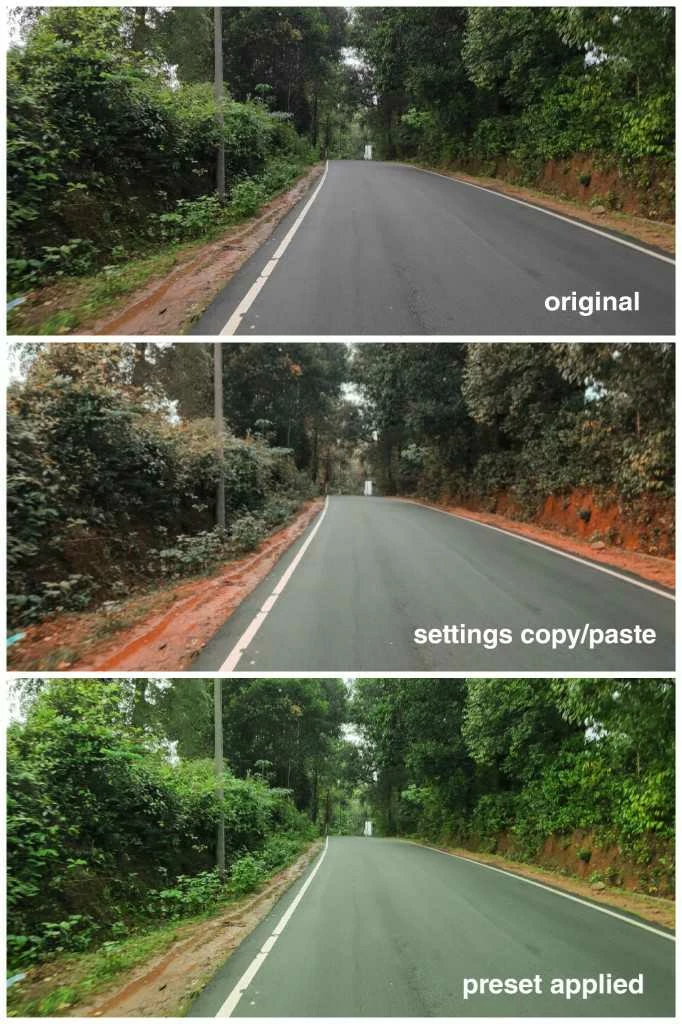
When I copy setting from a .dng file and paste it on an image it results in accurate color tone and perfect white balance.
But when I create preset from the .dng file and apply that preset on any images it results in a green tint, inaccurate colors and white balance change.
I'm stuck in finding a solution for this. Can anyone help me with this one?
Lightroom Mobile 4.3.1
Android Version - 9 (pie)
 AdChoices