Wolverine215
Participant
October 5, 2018
Answered

Lightroom not responding while edting

  • October 5, 2018
  • 1 reply
  • 546 views

When using lightroom and when I start editing whether it be using a preset, cropping, etc. It goes ghost looking and says not responding and I have to wait several minutes to continue. When it finally responds and I continue it does the same thing on every move I start to do. It happens on my pc and my new Microsoft Surface Pro. Not sure what to do. Any advice would be appreciated. New to the $10 a month game and wasn't expecting this. Thanks   
    This topic has been closed for replies.
    Correct answer Akash Sharma

    Hi Wolverine215,

    Sorry that Lightroom CC is not responding while editing your images.

    Are you using Lightroom CC or Lightroom Classic CC?

    I'd start with disabling the GPU usage in Lightroom to check if the issue is related to an outdated/unsupported GPU driver or not.

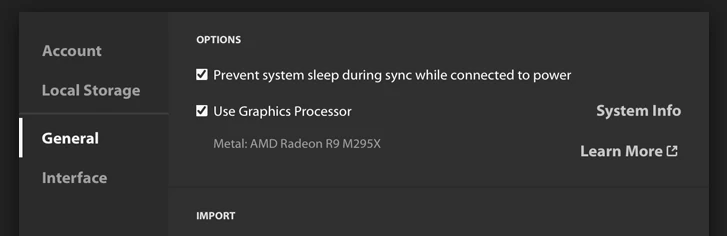
    To disable GPU usage in Lightroom CC, uncheck "use graphics processor" in the Preferences> General menu:

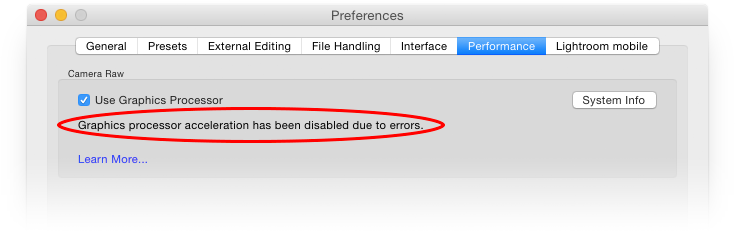
    In Lightroom Classic CC, uncheck the same option under the Preferences> Performance menu:

    Lightroom GPU troubleshooting

    Let us know if that helps.

    Thanks,

    Akash

    1 reply

    Akash Sharma
    Akash SharmaCorrect answer
    Legend
    October 8, 2018

    Hi Wolverine215,

    Sorry that Lightroom CC is not responding while editing your images.

    Are you using Lightroom CC or Lightroom Classic CC?

    I'd start with disabling the GPU usage in Lightroom to check if the issue is related to an outdated/unsupported GPU driver or not.

    To disable GPU usage in Lightroom CC, uncheck "use graphics processor" in the Preferences> General menu:

    In Lightroom Classic CC, uncheck the same option under the Preferences> Performance menu:

    Lightroom GPU troubleshooting

    Let us know if that helps.

    Thanks,

    Akash