
Participant
October 26, 2023
Question

Lightroom on iOS radial mask off by a few pixels

  • October 26, 2023
  • 1 reply
  • 164 views

When using the radial gradient option in Lightroom for Mobile's masking tool (on iOS), the actual masked area doesn't match what's indicated as being selected. This is best observed when reducing the feathering to 0. 
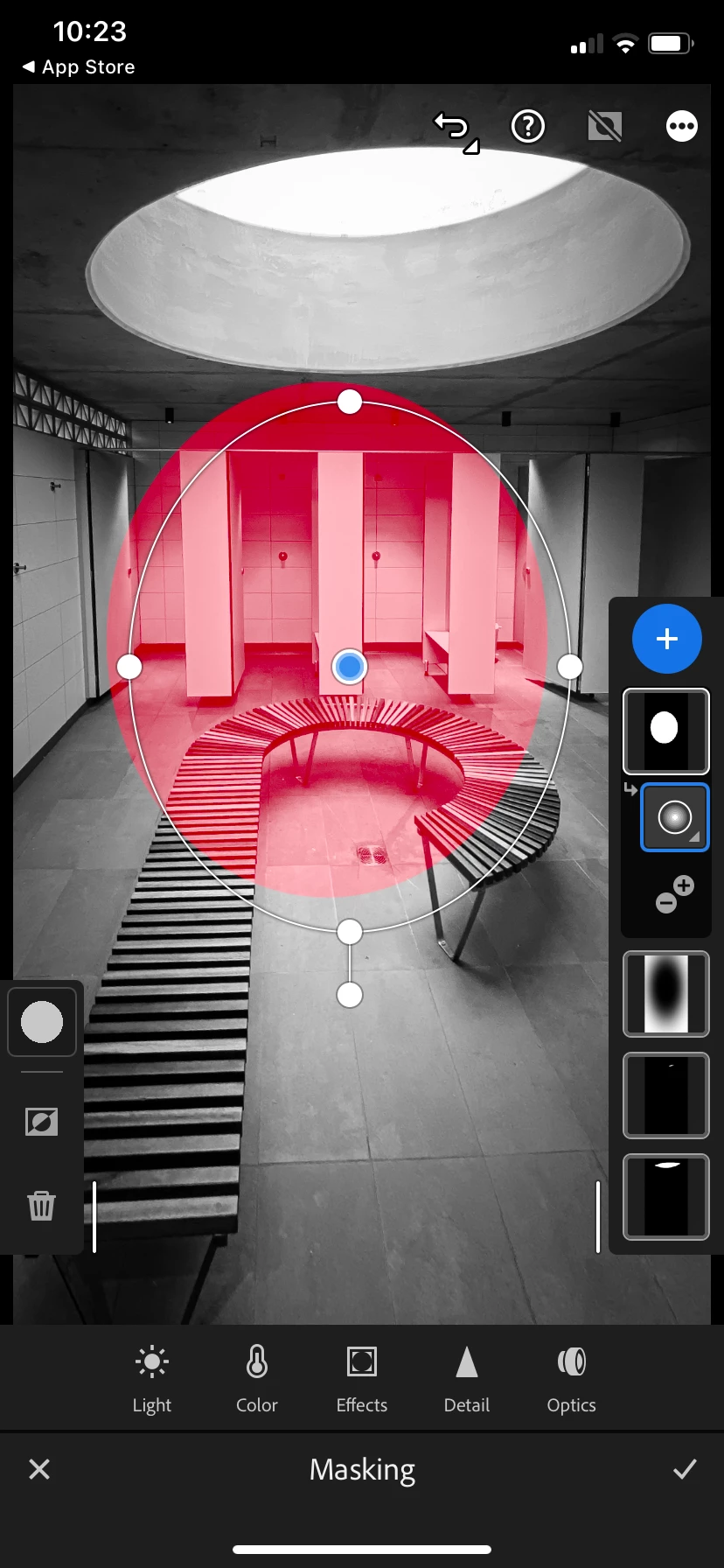
Is this a known issue?

This topic has been closed for replies.

1 reply

Rikk Flohr_Photography
Community Manager
October 27, 2023

I am unable to replicate this with the information provided. Moving from Bugs to Discussions. 

Note: 

Please include complete information in your reports, including device model, OS version, Lightroom version, and step-by-step instructions for reproducing. 

Thank you


Rikk Flohr: Adobe Photography Org
HeinpitAuthor
Participant
October 30, 2023

Hi Rikk,

Here is the information you asked for.

  • Lightroom (for Mobile) version v.9.0.0. 8AFC9B/112
  • iOS 17.0.3 on iPhone 11

Steps to reproduce:

  1. Open a photo in LR
  2. Click the Masking icon
  3. Click the Create new Mask icon (+)
  4. Choose Radial gradient
  5. Draw the gradient
  6. To make the issue more obvious, click the Feather icon, which will open a slider. Move it all the way down to 0.
  7. Compare the masked area (red) with the white outline that indicates what has been selected. In my case, they are off, see the screenshot.
Rikk Flohr_Photography
Community Manager
October 30, 2023

Unfortunately, I am still unable to replicate this - even with the new instructions. The closest device I have is an iPhone 13 Pro Max running  Lr 9.0 on iOS 16.6.1. I am updating this device to 17.1 today and will try again. 

Rikk Flohr: Adobe Photography Org