degibox
Known Participant
July 6, 2021
Answered

Lightroom says "New Version Available," but then does nothing after clicking "Update"

  • July 6, 2021
  • 2 replies
  • 524 views

Have Lightroom version 4.2 on MacBook Air M1 w/ Big Sur OS. Every time I've opened it in the last couple of weeks I've been prompted to start an update, but nothing happens. 


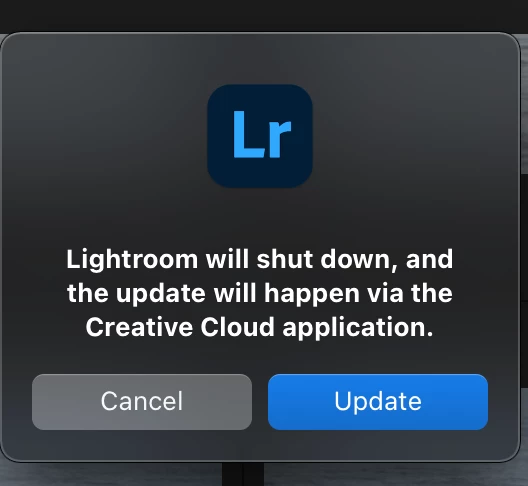
It says "A new version is available" and there's an "update" button (Figure 1). I click that and get a new button thay says "Lightroom will shutdown and the update will hapen via teh Creative Cloud Application," with the option to click a "Cancel" or "Update" button. I click "Update" aaaaand.....whole lotta nuthin'. LR stays open and the message in Figure 1 stays. 


What's going on? 
This topic has been closed for replies.
Correct answer JohanElzenga

Try updating directly from the Creative Cloud icon. It's in your menu bar. Click on it and select the 'Updates' tab in the panel on the left.


2 replies

Rikk Flohr_Photography
Community Manager
July 19, 2023

This thread is about Lightroom Desktop - not Lightroom Classic,  I will move your thread to the correct forum. 

Rikk Flohr: Adobe Photography Org
degibox
degiboxAuthor
Known Participant
July 6, 2021

Wouldn't just make sense for one to be able to easily EDIT a question?!?!? Why is this not possible? 


Anyway, Figure 1 is the bottom screenshot. Figure 2 is the top one. 

JohanElzenga
Community Expert
JohanElzengaCommunity ExpertCorrect answer
Community Expert
July 6, 2021

Try updating directly from the Creative Cloud icon. It's in your menu bar. Click on it and select the 'Updates' tab in the panel on the left.


-- Johan W. Elzenga
degibox
degiboxAuthor
Known Participant
July 6, 2021

Thank you!