



PandaramicMedia
Participant
October 25, 2022
Answered

Lightroom Starts Slowing as I'm brushing/masking

  • October 25, 2022
  • 2 replies
  • 288 views

I have a beefy computer so I can't see why it was start slowing while I'm using the brush tool while masking. So slow it gets frustrating because it will randomly create a straight line from where I first pressed down to where I am currently, or just not work at all.

PC Specs.
Motherboard : Gigabyte Z390 Aorus Pro
CPU : i9-9900K 3.8ghz w/ Corsair H100i RGB Platinum AIO
GPU : EVGA GeForce RTX 2080 Ti 11GB
RAM : Corsair Vengeance RGB Pro 32GB (2x16) DDR4 3200
This topic has been closed for replies.
Correct answer PandaramicMedia

This has seemed to help for anyone else looking for some answers.

2 replies

PandaramicMedia
PandaramicMediaAuthorCorrect answer
Participant
November 13, 2022

This has seemed to help for anyone else looking for some answers.

Sameer K
Community Manager
Community Manager
October 26, 2022

Welcome to the Lightroom community. I'll need more info to help you with this.


Do you work with a multi-monitor setup? Do you use SSD or HDD for your primary storage?

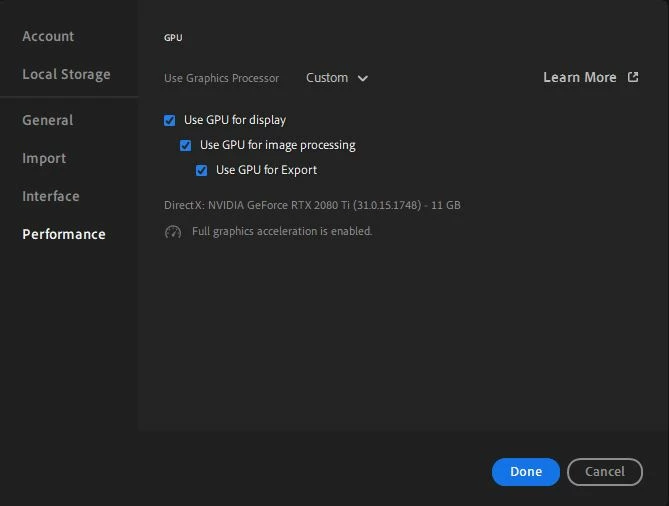
Please share the screenshot of the following options from Preferences.


Lightroom might be accessing the originals from the external drive if you are storing the original on an external drive.

Go to Lightroom > Edit > Preferences > Performance > Use Graphics Processor > Set it to Off if it is on Custom or Auto.
Test these possibilities & let me know how it goes.

Thanks!
Sameer K

PandaramicMedia
Participant
November 1, 2022

Sorry for the late response, I work through the week and don't have much time to hop on the PC.

I do use a multi monitor setup.
I have 2 1tb m.2 SSDs.
Here is the photo you requested.


I made the changes under the Performance tab that you suggested. I will get back to you if I still have any problems in the future.

PandaramicMedia
Participant
November 1, 2022

I can confirm I still have problems, arguably worse.


I used the mask feature and let it select the sky. I then duplicated and inverted the mask and upon adjusting the sliders it is slow and sometimes unresponsive, with the changes lagging behind. I didn't even use any brushes this time to edit the mask which is where I was having issues before.