

gpb14916
Participant
April 24, 2020
Question

Lightroom Tutorial Video #4: Where is the Thumbnail Slider?

  • April 24, 2020
  • 2 replies
  • 380 views

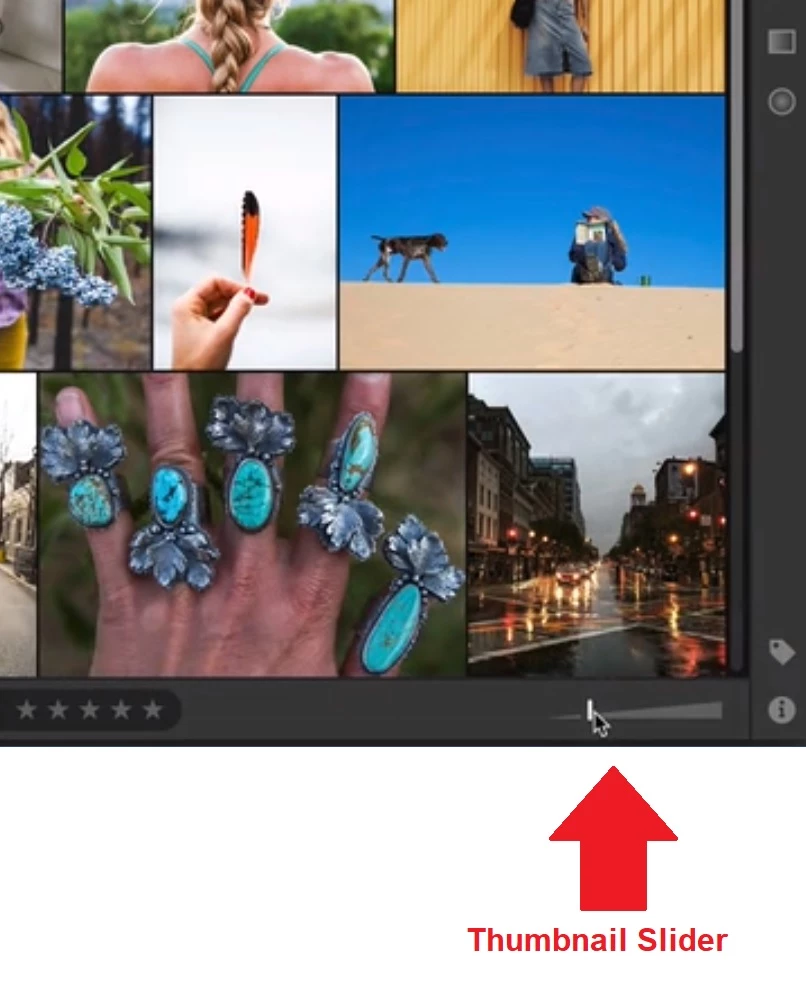
The Lightroom video #4, "View Your Photos" describes and demonstrates what the narrator calls a "Thumbnail Slider" at the lower right-hand portion of the display screen (please see screen shot). I cannot find the "Thumbnail Slider" anywhere.

  • If that control been moved, where is it now?
  • If that control has been removed from the product, is there an equivalent and, if so, where would I find it?

Thank you!
This topic has been closed for replies.

2 replies

Rob_Cullen
Community Expert
Community Expert
May 2, 2020

I see it in Grid Views-

It does not appear in 'Detail' view-

Is it possible your app window has been dragged slightly off screen?

Can you post your Version Number of Lightroom from the MENU: Help>System Info...?

Regards. My System: Windows-11, Lightroom-Classic 15.3, Photoshop 27.5, ACR 18.3, Lightroom 9.3, Lr-iOS 10.4.0, Bridge 16.0.3 .
Rob_Cullen
Community Expert
Community Expert
April 25, 2020

Which device are you using?

The slider does appear in Lightroom v3.2.1 when open on my PC desktop.

There is no slider that I see in the Lightroom App on my iPhone.

Regards. My System: Windows-11, Lightroom-Classic 15.3, Photoshop 27.5, ACR 18.3, Lightroom 9.3, Lr-iOS 10.4.0, Bridge 16.0.3 .
gpb14916
gpb14916Author
Participant
May 1, 2020

I'm using an HP laptop.