Participating Frequently
September 1, 2023
Answered

Lightroom won't let me change the pixels per inch

  • September 1, 2023
  • 2 replies
  • 3794 views

When I use Lightroom Classic this when exporting allows me to change the pixels per inch of an image, but my doubt is that when exporting in Lightroom CC version you can not change the pixels per inch of an image and automatically you export it in 240 dpi, is it so or am I wrong? and is there any section within Lightroom CC to change this, thanks and I hope for an answer,

.a hug to the entire Adobe community.


Correct answer Rob_Cullen

Yes there is.

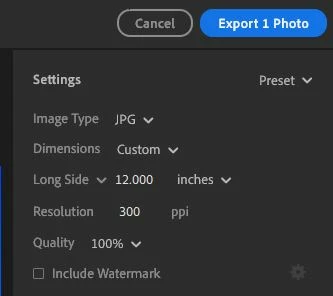
1) Do a Custom Export JPG

2) Change the 'Long Side' dimension to be in "inches"

3) Now you will see a 'Resolution' field to enter PPI

2 replies

clgarciaAuthor
Participating Frequently
September 2, 2023

Hi great I found it thanks for your answer, but I still have a little problem when I change it to inches, the pixels of my image 1080 x1350 px change completely, I have searched how I can change 1080 px to inches but when I do it in Lightroom CC it puts me the long side and the short side at the same size of inches, and therefore changes the size of my image, does anyone know the solution, or how I could put 300 ppi without having to change to inches.


Rob_Cullen
Community Expert
Community Expert
September 2, 2023

To put it simply- "PPI" has no meaning at all unless it is stated along with a physical dimension.

Digital files of the SAME pixel dimensions (eg. 4000x6000pixels) can be 1ppi or 1000ppi, and both are exactly the same image. The pixels have not changed. They will look exactly the same on screen. The PPI value is merely a value in the image metadata.


What is your purpose for wanting to specifiy a PPI value.?


However by specifying a PPI value in Lightroom Export, you need to also state the INCHES value for Lr to calculate the PIXEL dimensions of the exported file.

eg.  300ppi for a 10x12inch (print) will export a file that is 3000x3600pixels in size.    (300x10=3000)


Finally, consider Image "Quality" to be mostly dependent on the PIXEL dimensions of the image.

https://www.slrlounge.com/ppi-vs-dpi/


Regards. My System: Windows-11, Lightroom-Classic 15.3, Photoshop 27.5, ACR 18.3, Lightroom 9.3, Lr-iOS 10.4.0, Bridge 16.0.3 .
Rob_Cullen
Community Expert
Rob_CullenCommunity ExpertCorrect answer
Community Expert
September 1, 2023

Yes there is.

1) Do a Custom Export JPG

2) Change the 'Long Side' dimension to be in "inches"

3) Now you will see a 'Resolution' field to enter PPI

Regards. My System: Windows-11, Lightroom-Classic 15.3, Photoshop 27.5, ACR 18.3, Lightroom 9.3, Lr-iOS 10.4.0, Bridge 16.0.3 .
clgarciaAuthor
Participating Frequently
September 2, 2023

Hi great I found it thanks for your answer, but I still have a little problem when I change it to inches, the pixels of my image 1080 x1350 px change completely, I have searched how I can change 1080 px to inches but when I do it in Lightroom CC it puts me the long side and the short side at the same size of inches, and therefore changes the size of my image, does anyone know the solution, or how I could put 300 ppi without having to change to inches.