
Inspiring
July 30, 2024
Answered

Lightroom won't start for me
  • July 30, 2024
  • 2 replies
  • 266 views

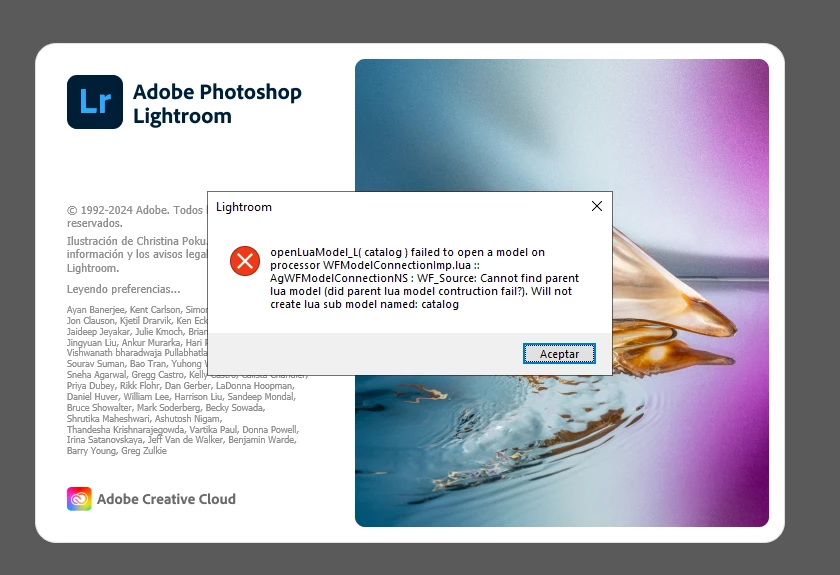
This error appears and I can't do anything else, it happens out of nowhere

This topic has been closed for replies.
Correct answer ismithan

Thanks, I was able to resolve it. If anyone tries and can't, I resolved it by using the program 'Everything' storage search for Windows. I searched for 'Lightroom' and deleted everything related to the program. If something couldn't be deleted, I used 'IObit Unlocker' to unlock and delete it.

PS: I tried uninstalling it from Creative Cloud and it didn't work.

2 replies

Rikk Flohr_Photography
Community Manager
July 30, 2024

You likely have a bad install.


Clean Lightroom Install Procedure

Close Lightroom

Restart the computer

Use the Adobe Creative Cloud App to uninstall Lightroom

Restart the computer

Install Lightroom via the Creative Cloud App without launching any other programs.

Restart the computer

Launch Lightroom

Wait 5 minutes


Rikk Flohr: Adobe Photography Org
ismithanAuthorCorrect answer
Inspiring
July 30, 2024

Thanks, I was able to resolve it. If anyone tries and can't, I resolved it by using the program 'Everything' storage search for Windows. I searched for 'Lightroom' and deleted everything related to the program. If something couldn't be deleted, I used 'IObit Unlocker' to unlock and delete it.

PS: I tried uninstalling it from Creative Cloud and it didn't work.

ismithanAuthor
Inspiring
July 30, 2024

When accepting this second message appears