
Participant
August 31, 2025
Question

Local catalog Problem

  • August 31, 2025
  • 1 reply
  • 134 views

Hi everyone,
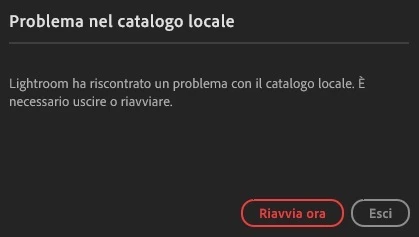
I haven't been able to access Lightroom for two days. When I open the application, a message appears about an undefined problem with the "local catalog" and the two options I'm given are to restart the program or exit the app; in both cases, the problem recurs. However, I have no problems using the web browser or smartphone versions. Has anyone encountered similar issues and could help me?

Additional information:
- Windows 11 OS
- Lightroom desktop


Thank you so much!


1 reply

Rob_Cullen
Community Expert
Community Expert
September 1, 2025

Try this suggested fix-

As Lightroom's catalog is in the cloud, you can delete the local catalog (or just rename it) and restarting LR will make it recreate one.  WIth the cloud-dependent Lightroom (Lightroom-Desktop), think of its catalog as just being a cache for when you are working offline.

To re-build the local catalog in Windows:

  1. On Windows Close Lightroom
  2. Hold down the [windows key] and Press [ R ] to bring up the run dialog
  3. Type %appdata% and hit return
  4. Navigate  the file path through Local to Data and open the folder with a long string of numbers
  5. Rename the file {Managed Catalog.mcat} to {Managed Catalog.old}
  6. Delete the {previews.db } database
  7. Close Explorer and re-launch Lightroom
  8. Wait for sync to complete


Regards. My System: Windows-11, Lightroom-Classic 15.1.1, Photoshop 27.3.1, ACR 18.1.1, Lightroom 9.0, Lr-iOS 10.4.0, Bridge 16.0.2 .