

NickNep
Participating Frequently
May 8, 2024
Answered

Location meta-data not populating when GPS coordinates provided

  • May 8, 2024
  • 1 reply
  • 563 views

Lightroom: 7.2

Platform: Mac Mini

macOS: 14.4.1


If no GPS data is captured with the photo I have taken, when I provide it in the Info side panel, the City, State, etc are not populated. Not sure exactly when this started, but it used to happen. Now it is not.
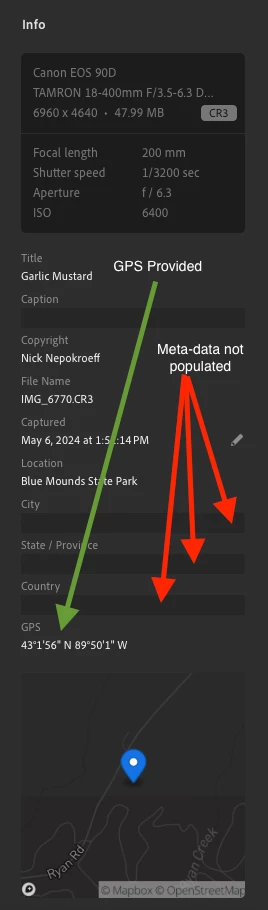
 

Please let me know if more info is needed. Is there a setting I should turn off/on?


Expected result: City, state and Country populated based on GPS coordinates.

This topic has been closed for replies.
Correct answer Rikk Flohr_Photography

Reverse geo-coding (translating lat-long info to location values) happens in the Cloud and works only for synced images. So it’s behaving as expected for Local Storage.

1 reply

NickNep
NickNepAuthor
Participating Frequently
May 8, 2024

I forgot to mention this is when using Local Files. Is this expected behavior?

Jim Wilde
Community Expert
Community Expert
May 8, 2024

Possibly/probably, though we would need Adobe to confirm. But certainly I see the same behaviour as you in local mode, though that is what I would assume would happen. Are you sure it used to happen when using Local mode?

Rikk Flohr_Photography
Community Manager
May 8, 2024

Reverse geo-coding (translating lat-long info to location values) happens in the Cloud and works only for synced images. So it’s behaving as expected for Local Storage.

Rikk Flohr: Adobe Photography Org