
Participating Frequently
November 2, 2025
Question

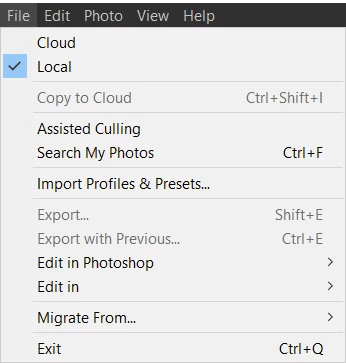
Lost all my photos, import button missing, can't import at all. Windows app

  • November 2, 2025
  • 1 reply
  • 505 views

After using LR for years, today when I wanted to work with some photos, Lightroom did not start as it should and every time showed message about connection error. At the same time, my Photoshop was working without any issue.

My filmstrip is empty, can't import new photos (no import button, shortcut isn't working), reinstalling the app did not help.

I want to keep my photos locally without being forced to copy them to cloud (which, in this case, doesn't work either)
 

1 reply

JohanElzenga
Community Expert
Community Expert
November 2, 2025

I can't check the menus because I type this on my iPad, but I notice that you are in Local mode. Local mode edits images without importing them. It just shows the content of the selected folder, so most likely a folder is currently selected that does not contain any images.


-- Johan W. Elzenga
Participating Frequently
November 2, 2025

The same thing happens with cloud. "Add photos" button is inactive.


Additionally, when I check the preferences, application is stuck on calculating my cloud storage.

All the photos from several years are gone


Community Manager
November 3, 2025

Please make sure you are logged into the correct account.  I see a subscribed account associated with the email you are using in this forum.  You can confim by logging into lightroom.adobe.com as well.


-Peter