



stephen b
New Participant
December 7, 2017
Question

LR mobile upload stuck (pending)

  • December 7, 2017
  • 30 replies
  • 21660 views

Hello,

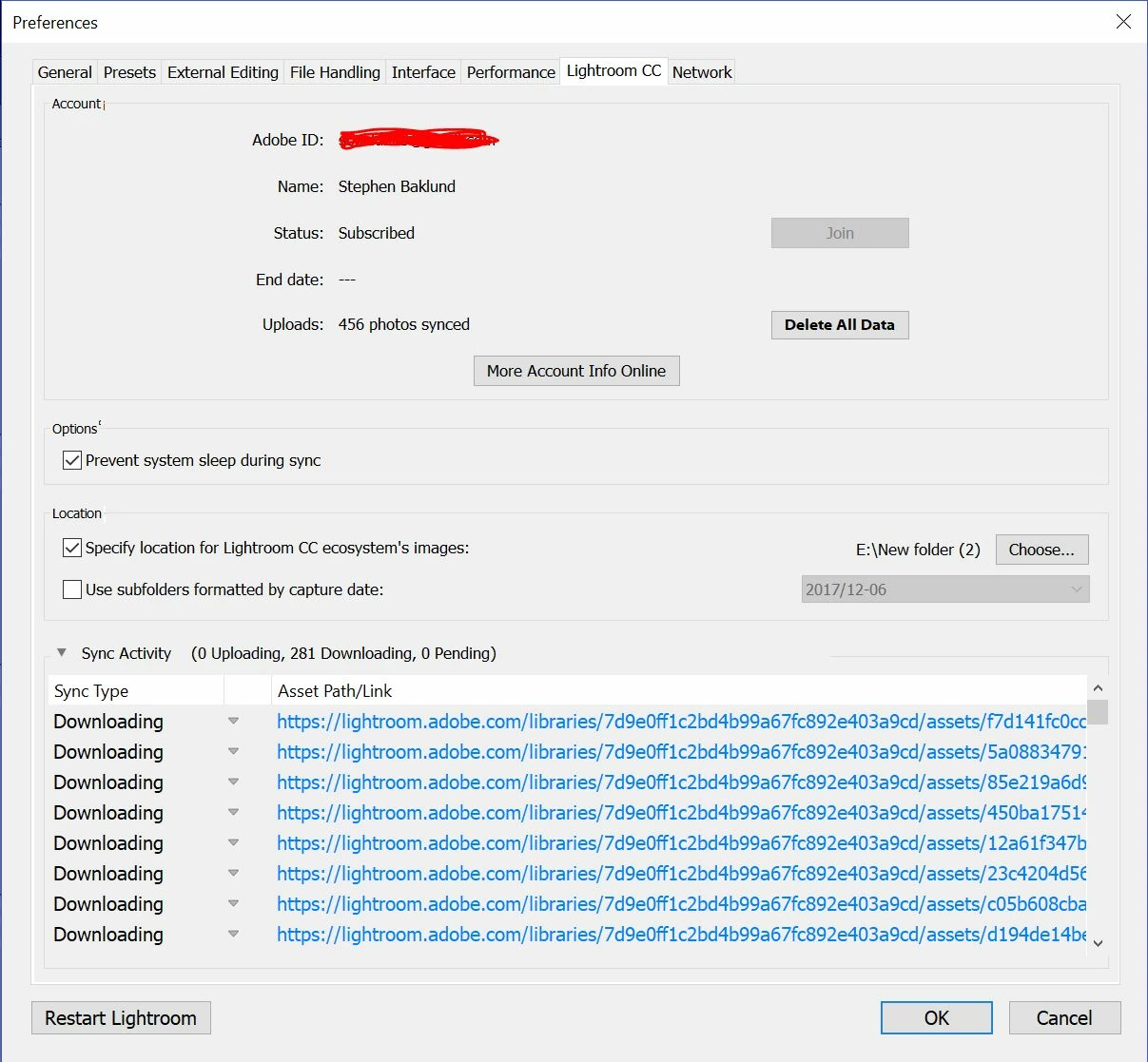
I have 281 Photos on my Iphone, in LR Mobile that will not finish uploading to Adobe CC. I successfully uploaded & downloaded 175 others (in the same catalog) onto my PC from my phone, but the other 281 have stopped uploading. It has said "Pending" for weeks now. I have updated (mobile & desktop), restarted, logged in & out to no avail. I can also see on my PC that 281 files are "dowloading" but nothing ever changes. I'm not sure if the problem is with the upload (mobile) or download (PC). Maybe there is a way to re-fresh, or cancel & restart the sync? I would like to get the rest of the photos from my phone onto my PC, someone please help!

This topic has been closed for replies.

30 replies

Participating Frequently
November 26, 2022

2022 Same issue, 2 pending forever on ipad. no way to tell which photos or any other option to resolve. Completely reliable for a pro workflow. 

New Participant
November 8, 2022

Five years since this bug was first reported. Given how much this app costs per month, could we ask for a fix?

Community Manager
November 17, 2022

@Ian27021691hbic there's no way of telling if all these users had the same issue.
Are you having any issues at the moment, if so from which client?

Thanks,
Ignacio

New Participant
July 9, 2021

I had this same issue on my iPad. I went away on vacation, took numerous photos, and uploaded them to my iPad Lightroom app. It's important to note that I was on an island with no internet access. I returned home, connected my iPad to my home WiFi, and nothing synced.


Coincidentally, I received a message on my iPad that I had not backed it up in two weeks. I went into Settings and manually told it to backup. I then received a message that I had run out of iCloud storage space. I purchased more and the backup issue was resolved. 


Poof! The Lightroom syncing issue disappeared immediately. Someone smarter than me can tell me why. 


I hope this is helpful. 

NaijaMango
New Participant
February 27, 2021

Well this isn't looking good - Feb 2021 and I'm having the same issue and nowhere in this two page thread does a solution appear. Way to go Adobe. 

Community Manager
March 16, 2021

Hi, 

have you noticed any improvements with the 6.2 version?

thanks,
Ignacio

New Participant
June 23, 2021

It's June 2021 and I am still having sync issues. I fixed it on my pc by renaming the Lightroom folder and forcing it to rebuild its database but I have no idea how to fix the problem on my iPad Pro. There is one picture pending to upload and I don't know which one, Lightroom (iPad) only shows 1207 of the 1900 photos that are in the cloud and none of the edits i make on my iPad appear on my other devices or in the web version. Please fix this ongoing issue, I want to stick with Lightroom but it is basically unusable if nothing is able to sync.

Known Participant
July 1, 2019

I had the same problem with 1 picture out of 13, so my problem was not as urgent as it was for several people. What I did did NOT solve the problem. It was a turn around. For example:

1. Send the picture to Camera Roll

2. A few seconds later, in Windows 10, the picture will appear in "C:\Users\[Name]\Pictures\iCloud Photos\Downloads\APC_0026.jpg"

Note that the original was a DNG file. Sending it to Camera Roll converted it to JPEG. I can live with that for this one picture, but from now on I will think twice before using Lightroom Mobile. It's been two years since this problem appeared, and nothing seems to be done.

girlwithacurl
New Participant
May 12, 2019

Having same issue. 838 pending uploads all day. HEIC files taken with iPhone uploaded without an issue. i had no problem importing the Raw images to Apple Photos app from memory card and had no problem importing those photos into Lightroom Mobile. Just can’t upload so I can access from Mac and/or iPad.

Oddly, the percentage uploaded continues to increase and is now at 81%, despite the number of pending uploads remaining consistent at 838. And, yes, checked. no photos have synced with Lightroom CC on my Mac and none show up in LR cloud library in browser.

Disheartened that this has not been resolved, Adobe, considering the number of users across multiple devices and multiple platforms complaining about it —for 2 years in this thread alone. All my apps on iPhone and mac are latest version, BTW.

This may be the straw that breaks this camel‘s back. Already so irked by Lightroom Classic only sharing smart previews and Lightroom CC’s comparatively anemic functionality.

Seemed like my mobile-first workflow was going to speed things up and allow more flexibility. Instead continues to be one workaround after another. Now also getting constant requests to log in to Creative Cloud app every time i try to open CC file folder in iOS, despite being already logged in when i open the CC app on my phone.

Also why the two factor verification on my iPhone for this forum if I have my Lightroom app open and am logged in with my Adobe ID?

The amount of overhead just to do basic tasks is tarnishing your product and the lack of resolution—or response even—of this bigger issue in this forum is alarming.

Maybe it’s a sign you should spend less time with Sensei and more time on basic dev work on your core products.

Community Manager
May 16, 2019

Hi Kate,

Did the issue get solved with the 4.3 update?
Please always let us know which other Lightroom version you are using.

To all others with issues:
please mention which clients you use for syncing, also please test with the latest version of all used Lightoom versions over all devices/machines.

thanks,
Ignacio

DachLaeuferin
New Participant
March 9, 2019

Same issue here! 2247 pictures pending for days now... 

New Participant
February 12, 2019

Guys. Admins. As someone said earlier, a cloud based system is worthless unless it works reliably. My partner and I are photogs in the music industry. We just got back from a huge album shoot in S Africa w a major label and then Grammy week with our artists right after that. We recently spent over $4k on two brand new iPad pro 11”’s to be completely mobile without lugging laptops & external hard drives. We told our clients this new system makes turnover lightning fast. Now with sync issues, we look like fools with multiple clients wondering where the hell their photos are - what do I tell them? “Sorry, adobe’s having sync issues“ “Well, when will we get them?” “Idk, waiting on a flaccid response from an adobe forum admin covering for the Dev team that didn’t foresee this”

My reputation, my clients, my gd career is on the line bc of your sync issues. Please have your tech call me to figure this out (one who actually knows how to) before I go on a massive online terror campaign.

Thanks,

*frustrated adobe user*

iamsickofforumnames
New Participant
February 12, 2019

My sync issues did resolve. Though I'm not sure what did it. I was fortunate to receive a dialogue box asking me to rate what I thought of Lightroom CC and if I would recommend it to friends. I attribute the miraculous overnight syncing to the scathing comments I made on the form, though it could have been a coincidence?

One other tip - make sure your device doesn't go to sleep - the internet needs to be stable and not drop out at all.

Participating Frequently
March 1, 2019

I am still having this issue and received no rating request yet

iamsickofforumnames
New Participant
January 14, 2019

I have sync issues on all my Lightroom CC (latest 2018 version) libraries. So hoping someone can help me sort this out.

On my desktop - iMac - it tells me there are 8,233 photos in my Library. And it says I'm syncing 7,157 photos. The amount of space used, however, never changes - (137Gb used out of 1TB)

Online it tells me there are 4,401 photos in my Library and 3,909 Sync Issues and when I look further into these issues, there are placeholders instead of images with the message "IMG_567 Imported on (date) open Lightroom on iPhone to continue syncing."

On my iPhone - where Lightroom CC IS open. There are 4,475 photos in the Library it says "Uploading - 74 Pending (35%)"

I have had my iPhone plugged in and connected to Wifi for 3 days and nights, have logged off and back in on all devices, restarted. Refreshed Wifi etc and yet the photos don't seem to be uploading. It is a large photo Library but at this rate, it will take months to upload to the cloud. Is this really worth it?

Any advice greatly appreciated.

New Participant
January 7, 2019

I have the same problem with iPhone XS. Sync working great with iPad and Windows Lightrooms (Classic CC and CC). There is no Sync errors at lightroom.adobe.com. This is very frustrating.

New Participant
January 13, 2019

There is solution:

1. Log out from Lightroom CC

2. Uninstall and reinstall Lightroom CC

3. Manually import previously pending images

...and syncing works again