



kath_5800
January 10, 2026
Answered

LR need to go back to older version - help please

  • January 10, 2026
  • 1 reply
  • 209 views

I have eventually updated Lightroom Desktop version but it is not suitable for my old laptop.  I need to go back to previous version and have read about clicking on 3 dots which I have tried but no option to go back to previous version, please can someone help me

Correct answer Jim Wilde

You can't go back far enough using the Creative Cloud app. The oldest available version appears to be 6.5, but Denoise was introduced in 6.3. You would have to contact Adobe's Customer Care team to see if they can make a pre 6.3 download available to you.


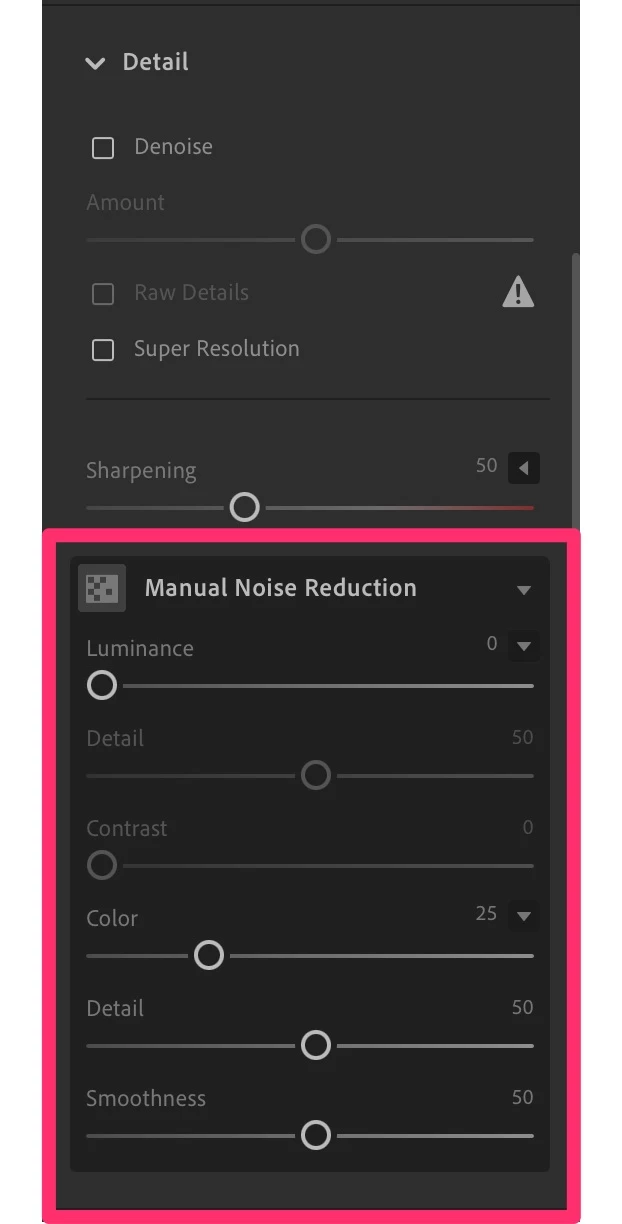
However, if you're just trying to avoid Denoise, you do realise that don't actually have to use it, the previous manual noise reduction sliders are still available to use in the current version:


Notification_Center.jpg

1 reply

Rob_Cullen
Community Expert
Community Expert
January 11, 2026

Depends what "three dots" you are clicking-

For Lightroom-Desktop on a Windows computer:

1) Open the Adobe Creative Cloud Desktop App.

2) Select the [Apps] icon.  (You can also limit the apps showing to 'Photo' near the top line)

3) In the box for Lightroom  is where you click the three dots [More actions].

4) Select [Other Versions]

5) Choose a version to install.  (I can see back to v6.5 in my list.)

2026-01-11 12_28_46-Creative Cloud Desktop.jpg    2026-01-11 12_28_56-Creative Cloud Desktop.jpg    2026-01-11 12_29_17-Creative Cloud Desktop.jpg


Regards. My System: Windows-11, Lightroom-Classic 15.4.1, Photoshop 27.8, ACR 18.4, Lightroom 9.4, Lr-iOS 10.4.0, Bridge 16.0.3 .
kath_5800
kath_5800Author
January 12, 2026

Thank you I've found that, now which version lol need before the new Denoise stuff 

Jim Wilde
Community Expert
Jim WildeCommunity ExpertCorrect answer
Community Expert
January 12, 2026

You can't go back far enough using the Creative Cloud app. The oldest available version appears to be 6.5, but Denoise was introduced in 6.3. You would have to contact Adobe's Customer Care team to see if they can make a pre 6.3 download available to you.


However, if you're just trying to avoid Denoise, you do realise that don't actually have to use it, the previous manual noise reduction sliders are still available to use in the current version:


Notification_Center.jpg