
Participant
March 30, 2024
Answered

(Mac) "No Images that can be imported found in the selected source"

  • March 30, 2024
  • 3 replies
  • 1614 views

When I try to import from my SD card (using a USB reader or internal SD card slot), Lightroom says "No Images that can be imported found in the selected source". Instead, I need to import from "Browse" and select the SD card in the Finder.

Correct answer resourceful_creator15B9

I was having the same issue. The way I fixed it was:

  • Close Lightroom
  • Open the Mac 'System Settings' app
  • Navigate to 'Privacy & Security'
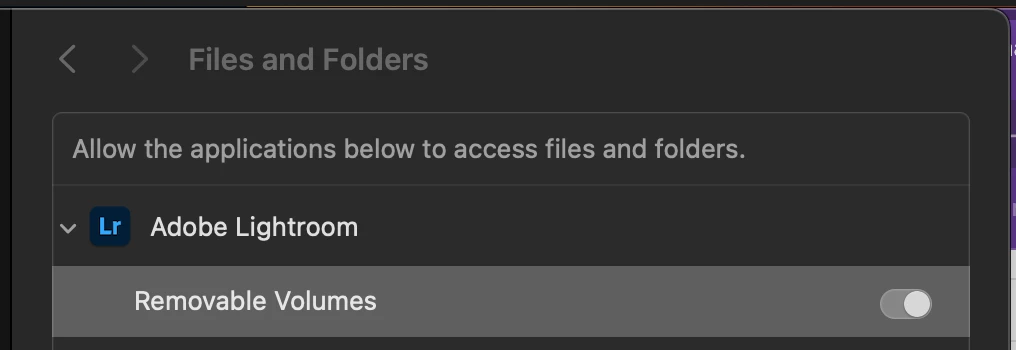
  • Open 'Files and Folders'
  • Expand the 'Adobe Lightroom' entry
  • Turn off the 'Removable Volumes' setting
  • Turn on the 'Removable Volumes' setting
3 replies

Participant
May 25, 2025

I was having the same issue. The way I fixed it was:

  • Close Lightroom
  • Open the Mac 'System Settings' app
  • Navigate to 'Privacy & Security'
  • Open 'Files and Folders'
  • Expand the 'Adobe Lightroom' entry
  • Turn off the 'Removable Volumes' setting
  • Turn on the 'Removable Volumes' setting

Participant
August 28, 2025

Yo! This is a fix for for when lightroom cc would freeze import from my iPhone, then stop importing entirely, upon reopening LR it would see the phone but not load any of the photos. 


This issue has existed since.. like.. LR 6 lol! I used to use MacOS image capturre or Reboot or stop/start a service, Helper i think but I couldn't remember. Saw your comment snd permissioning fault made sense. Tried it and worked instantly without rebooting, opened LR and iPhone showed up and I was able to restart my import. 


Thank you for posting your solution!! 

Participant
July 15, 2024

Did you find the solution? I see that no any informative response? I have the same issue & do not find sollution. Interesting point on LR Classic it is working.


JohanElzenga
Community Expert
Community Expert
July 15, 2024

The OP did get an informative respons and did not come back after that, so I assume his issue was solved. Please post a screenshot of the import dialog (so the dialog before you get the error). Embed it please, using this button , do not attach it.


-- Johan W. Elzenga
Participant
July 15, 2024

After cnnection my D850 I have button to import from camera directly to LR CC. 

After push button I got message:


Interesting that in LR Classic (as also in othe app, like Photoshop, Apple Picture, etc) it works perfectly:


My setup: 

Mac OS Sanoma 14.5, MacBook Pro M2 Max, LR CC version - 7.4.1 


LR Clasic version  13.4

All security access for LR CC  is enabled:


JohanElzenga
Community Expert
Community Expert
March 31, 2024

Make sure Lightroom has full disk access. Read this (it's about Lightroom Classic, but the same applies to Lightroom desktop): https://community.adobe.com/t5/lightroom-classic-discussions/quick-tips-how-to-give-full-disk-access-to-lightroom-classic-on-macos/td-p/12913413


-- Johan W. Elzenga
jackamickAuthor
Participant
April 19, 2024

Yes, it does have full disk access. 

JohanElzenga
Community Expert
Community Expert
April 19, 2024

I just looked at your screenshots. In the second screenshot you need to open the DCIM folder. That should do it.


-- Johan W. Elzenga