
FarmerKrach
Inspiring
October 28, 2018
Answered

macOS Mojave [Trouble uploading to Lightroom from my iPhone]

  • October 28, 2018
  • 2 replies
  • 416 views

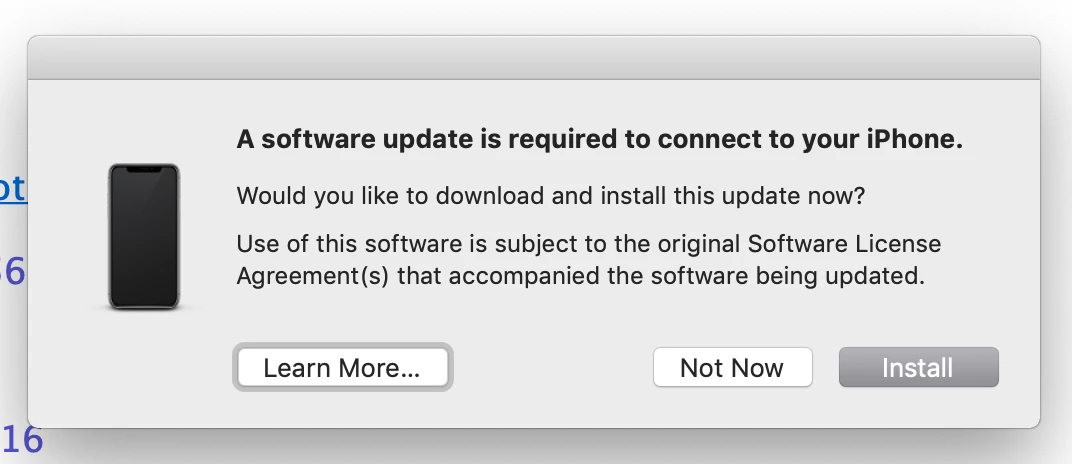
Ever since I "upgraded" to macOSMojave I'm having trouble uploading to Lightroom from my iPhone. I get the messages, "You cannot connect with iPhone until you update some software."  And when I try to click the install, I get the message, "Software is not available from the software update server."  So, anybody know whether Mojave could be interfering with Lightroom and how I can update my phone? thanks
    This topic has been closed for replies.
    Correct answer FarmerKrach

    It seems to be from iTunes

    2 replies

    selondon
    Community Expert
    Community Expert
    October 30, 2018

    Is the message a Lightroom message or is it a Mac OS/iTunes one?

    I’m not running Mojave or iOS12, but could it be that Mojave requires devices to be running iOS12 to connect?

    FarmerKrach
    FarmerKrachAuthorCorrect answer
    Inspiring
    November 6, 2018

    It seems to be from iTunes

    Community Expert
    October 28, 2018

    What version of Lightroom are you using? If you use Lightroom CC in the current version, it is far simpler to import through Lightroom on the iPhone. Images will show up automatically in Lightroom CC on the Mac. The software update message seems to suggest you are using an old Lightroom version so check what version you have.

    FarmerKrach
    Inspiring
    October 30, 2018

    I use Lightroom Classic CC, but because Lightroom CC is also on my computer, I wonder if that could be complicating things now that I've upgraded to Mojave.  Someone told me that many old programs wouldn't work with the new Mojave.