


Participant
Sep 2, 2026 3:03 PM UTC
Answered

masking automatically making adjustments

Version 9.5.1 Has started today making adjustments when you create a new mask. I had to downgrade to the prior version to continue working on my gallery. Very frustrating. So tired of lightroom issues.

    Victoria Bampton LR Queen
    Community Expert
    Sep 2, 2026 3:45 PM UTC

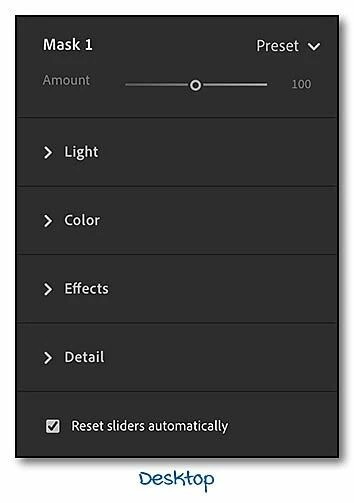
    This is where you’re looking for it:


    Victoria - The Lightroom Queen

    4 replies

    Victoria Bampton LR Queen
    Community Expert
    Community Expert
    Sep 2, 2026 3:11 PM UTC

    At the bottom of the Masking sliders, is Reset sliders automatically unchecked? It needs to be checked if you want to start from 0 each time you create a new mask.

    Translate
    Victoria - The Lightroom Queen
    Participant
    Sep 2, 2026 3:14 PM UTC

    I dont see that option. Im not in classic if that helps. Ive never had to do this so this is something that changed on their end. My only option was every time I create a mask I could reset the sliders, but I dont want to have to do this every time. I just downgraded to fix it but not this version (9.5) collapses every slider category when I open a new picture. Its insane really the amount of bugs

    Translate
    JohanElzenga
    Community Expert
    Community Expert
    Sep 2, 2026 3:20 PM UTC

    Nothing changed. The option to reset all sliders is still there in Lightroom 9.5. Apparently it simply got unchecked. Scroll to the bottom of the mask sliders panel.

    Translate
    -- Johan W. Elzenga