


December 11, 2025
Question

Masking problem
  • December 11, 2025
  • 2 replies
  • 162 views

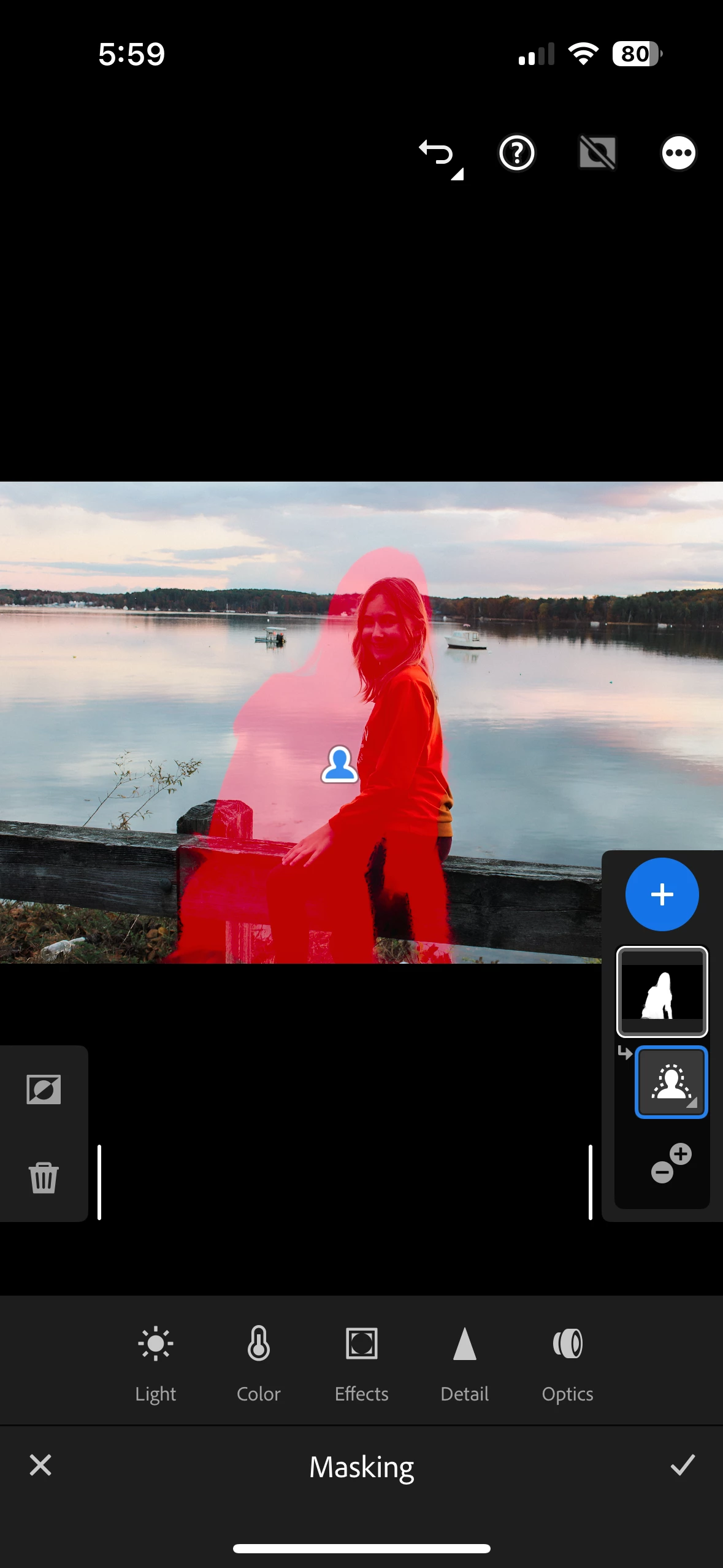
 In Lightroom Mobile I've been having this problem for months. When I auto mask the subject it creates what appears to be the shape of a woman. When I auto masks the background it inverts this shape. It happens on numerous photos, and it's always the same exact shape. 

I also have Lightroom classic and this does not happen.


Things I've tried:

Closing and reopening LR mobile

Starting from scratch

Uninstalling and reinstalling 

Logging out and back in

Checking to make sure I have no other existing masks.

Making sure presets have no existing masks

Not using any presets 


Any help would be very much appreciated! 

2 replies

Adobe Employee
December 11, 2025

Hello @realistic_moonbeam6821 

What you describe and show in your screen image sounds like a bug that was fixed back in our April 2025 release.

I know you said you re-installed the app, but like my colleague Alek, I wonder if you could confirm you're running the latest app version.  We release 11.1 just yesterday, and if you're not updated to this please visit the Lightroom listing in the App Store app to see the update.


I asked my teammate how logged the original bug if an affected asset will continue to see the problem, and she said simply updating the app should clear up the problem.


If you update, and can still reproduce the problem, we'd like to know:


  • your device model and iOS version, and LR app version info as Alek mentioned. 
  • Also it would help to know your workflow -- specific sequence of steps may be really important.  If it's easier to upload a screen recording, this page describes how to make one: https://support.apple.com/guide/iphone/take-a-screen-recording-iph52f6e1987/ios 
  • are these images imported on mobile or desktop, or edited on desktop before LR Mobile edits them?
  • Are you applying a custom preset in your LR app Settings, under Import > Raw Default?


Thanks for sharing info that will help us understand this better.

Community Manager
December 11, 2025

Hi @realistic_moonbeam6821, welcome to the community!
Could you let us know which version of Lightroom Mobile you’re using, along with your iPhone model and iOS version? Does this happen with every photo or just certain ones? Please make sure your connection is stable, and if you can, test whether the same issue occurs on Lightroom Web: https://adobe.ly/44qShlM
If you’re able to share a short screen recording of the issue, that would really help us take a closer look.
Thanks so much!
Alek

*(If you mention me with an @, like @Aleke, I’ll get a notification and can respond faster.)*