Participant
October 20, 2020
Answered

Missing Plug-in Manager (Newbie)

  • October 20, 2020
  • 1 reply
  • 501 views

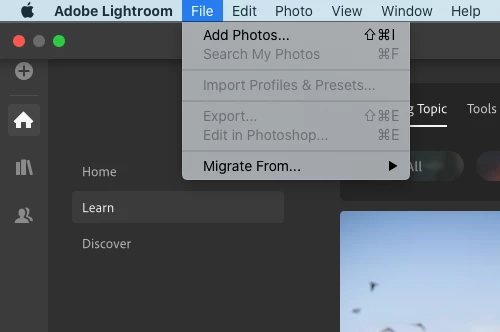
Hi All.  Please be patient with this newbie. 🙂 I am in the process of converting over from Apple Photos.  I've had enough of their file management chaos.  As a result of the challenges, I have a TON of duplicates to get rid of.  I downloaded a plug-in to do this. Directions say to click on File, Plug-In Manager.  I must be blind because I can't find the plug-in manager anywhere.   I have lightroom v3.4 installed locally on my Mac.  What am I missing?


This topic has been closed for replies.
Correct answer JohanElzenga

You are following instructions for Lightroom Classic, but you are using Lightroom (desktop). Lightroom desktop does not support plugins.


1 reply

JohanElzenga
Community Expert
JohanElzengaCommunity ExpertCorrect answer
Community Expert
October 20, 2020

You are following instructions for Lightroom Classic, but you are using Lightroom (desktop). Lightroom desktop does not support plugins.


-- Johan W. Elzenga
Participant
October 20, 2020

*SIGH* I thought it would be something like that.  Thanks.  Sounds like I need to switch to Lightroom Classic.