
Participant
April 30, 2018
Answered

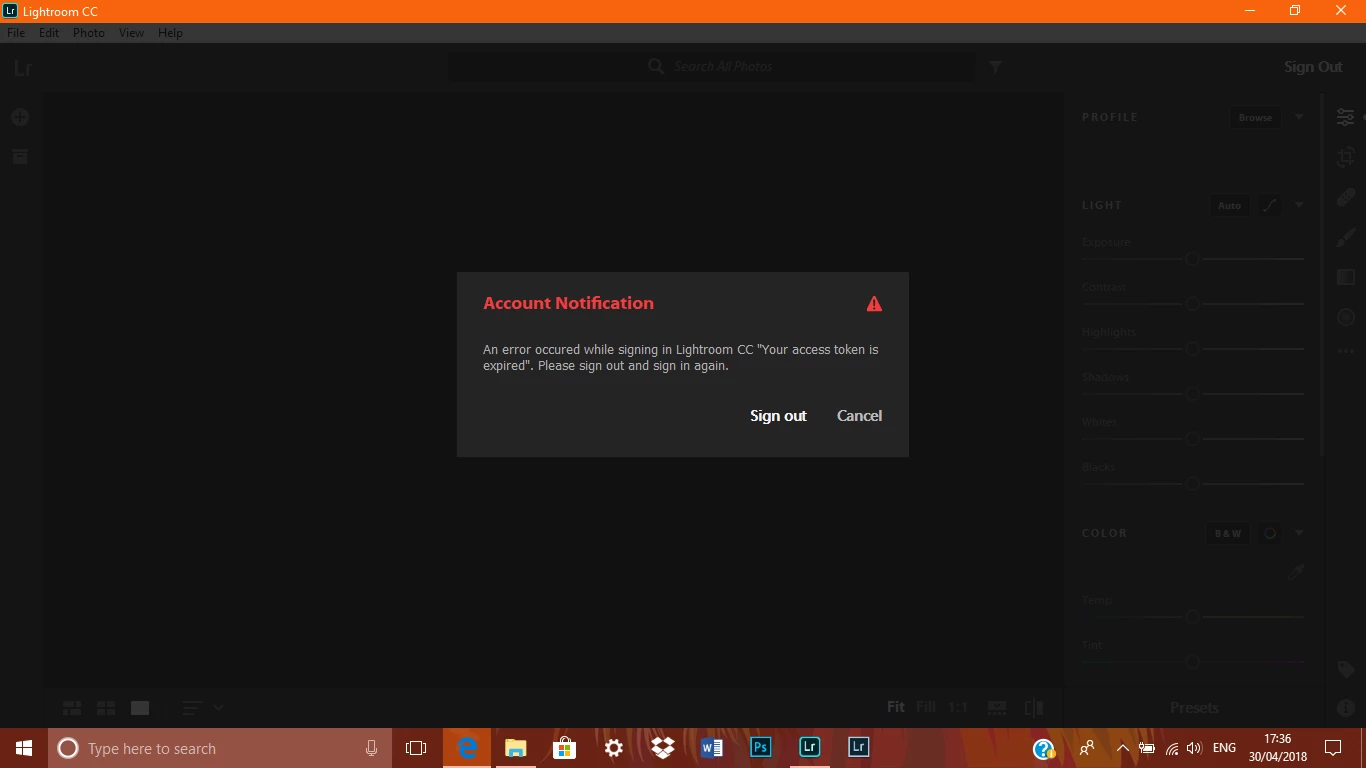
My access token has expired!
  • April 30, 2018
  • 7 replies
  • 4090 views

For the past month or so I have not been able to access my Lightroom CC application, it shows this Account notification, I've missed deadlines, lost Jobs because I could not deliver as promised on time, does anyone have a fix to this solution, I've been in contact with Adobe support several times over the phone and they have been no help at all. Any solution that is worth trying would be much appreciated.

operating system: Home PC, windows 10.

Sean.

    This topic has been closed for replies.
    Correct answer selondon

    Just happened to me, I signed out LrCC and out of the Creative Cloud App and the back in. This worked for me.

    7 replies

    jdgd1
    Participant
    September 25, 2018

    I'm having the same issue. This continues to happen to me if I don't open Lightroom CC on a daily basis. Using the steps outlined above by wintermute314 fixes the issue, but I should not have to log in and out of all my Adobe software of a weekly basis.

    Participating Frequently
    July 21, 2018

    A nice man on the adobe chat was able to solve this problem. Here are the steps he posted

    from: Validating Software License Loop

    Activation issue windows

    1) Close all adobe related processes in task manager (Core sync, services for adobe desktop app, adobe desktop service, Adobe IPC broker, AAM updater)

    2) Navigate to following locations and assign the current user full permissions to adobe folders. (Right click on adobe folder select properties then click security tab , click edit and select current user you are signed in with , select full control , click apply and then ok)

      C://program data (enable view hidden files to see this folder)

      C://program files 86x/common files

      C://program files 86x/

      C://program files/common files

      C: //program files/

    3) rename SLstore to Slstore.old at following location c://program data/Adobe/

    4) Rename SLcache to Slcache.old at following location C:\Program Files (x86)\Common Files\Adobe

    4) Navigate to c://users/username/appdata/local/adobe/oobe and rename Opm.db to opm.old

    5) Navigate to c://windows/system32/drivers/etc/ and open hosts file using notepad. IF you see any Adobe entry there please replace that hosts file with a new hosts file which does not have any adobe entry. If there is no Adobe entry leave the hosts file as it is.

    6) Launch cc app and sign in .

    Participating Frequently
    September 2, 2018

    Sorry, this seemed only to be a temporary solution. Soon the problem was back.

    I contacted them again and support logged in on my computer but were not able to solve it.

    I got a phone appointment when they would try again, but support didn't call until some days later (I was not a home so we had to reschedule). They said it was very busy

    We made a new appointment but they didn't call back... This was more than a week ago. No call since...

    And still: "your access token has expired".

    Horrible: I hope somebody from Adobe reads this...

    Just an advice to new users: don't go for Lightroom CC until this is solved. I've got 75.000+ photos that I cannot access.

    Participant
    July 20, 2018

    I have the same issue...is there a resolution?

    Participant
    July 3, 2018

    I have been having the same problem for a few days. Tried signing out of Adobe CC and Lightroom CC, no success. Even reinstalled the software, still no success. Finally I solved the problem by uninstalling the software completely, including user preferences then reinstalling from scratch. Hopefully this method will work for others suffering with the same problem.

    This is my first experience with Adobe software and to be honest it has tainted my opinion somewhat.

    Anyway, hope this info can help.

    Participant
    July 3, 2018

    Spoke too soon! Problem is reoccurring. Cant seem to find an alternate solution so will be cancellin my membership.

    Niknokq
    Inspiring
    June 13, 2018

    Seems not so interesting..

    Well, its an easy job.. The customer pays every month and the company doesnt cares a **** about the problems... Only some blablabla about using virtual environments -bullhit!- look the forums! there are hundreds of people with the same problem..

    Pay some people to stop that problem. I watch this for month, if its not solved or i get PROPER SUPPORT within 4 weeks i will QUIT with Lightroom.

    Participant
    May 11, 2018

    This just happened to me this morning. What is this and how can it be resolved? I have work to do and can't get it done. Running latest beta on Mac and latest Adobe updates.first time it's happened.

    selondon
    Community Expert
    selondonCommunity ExpertCorrect answer
    Community Expert
    May 13, 2018

    Just happened to me, I signed out LrCC and out of the Creative Cloud App and the back in. This worked for me.

    Participant
    May 14, 2018

    Did the same and was good. But what was it all about?? Annoying. And some people still have it. even after signing out and back in.

    Sahil.Chawla
    Adobe Employee
    Adobe Employee
    April 30, 2018

    Hi Sean,

    W're sorry that you're getting the error "Access token expired" when you open Lightroom CC. could you please let us know which exact version of Lightroom CC you're working on and which operating system are you using?

    Regards,
    Sahil

    Participant
    April 30, 2018

    Hi Sahil,

    Thank you for responding to my question, I just checked there I'm using the version 1.3 and my operating system is windows 10. Any suggestions?

    Sean.