
Participant
May 2, 2023
Answered

Noise Reduction Duplicates

  • May 2, 2023
  • 1 reply
  • 1019 views

After flagging the photos i like i i sort by flagged. i then send the batch of photos thought auto ai. after this i usually send them though denoise and here is where i find a issue. after i send them though denoise i end up with duplicates of the entire batch. i cant seem to find a way to sort them so i only see the new photos that have been sent though the denoise feature. anyone know a way for me to only see photos that have been though noise reduction?
This topic has been closed for replies.
Correct answer Sameer K

Hey, @dustin22159554nqn5. Welcome to the Lightroom Community. I'll help you figure this out.

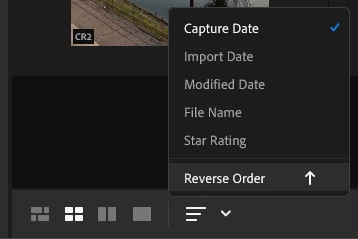
You can use the sort order to arrange the album by modified date from the sort filters at the bottom.


Or you can search for .DNG in the contextual search bar. Now, this will list all & any DNG files in your Lightroom library.

You can further apply the sorting filter. This should help to some extent.

Let me know how if it does.
Thanks!
Sameer K

1 reply

Sameer K
Community Manager
Sameer KCommunity ManagerCorrect answer
Community Manager
May 2, 2023

Hey, @dustin22159554nqn5. Welcome to the Lightroom Community. I'll help you figure this out.

You can use the sort order to arrange the album by modified date from the sort filters at the bottom.


Or you can search for .DNG in the contextual search bar. Now, this will list all & any DNG files in your Lightroom library.

You can further apply the sorting filter. This should help to some extent.

Let me know how if it does.
Thanks!
Sameer K

Participating Frequently
September 17, 2024

why is there not a way to automatically hide the unedited images after denoise has been applied?