
Participant
November 26, 2024
Answered

Non movable masks for mobile lightroom

  • November 26, 2024
  • 2 replies
  • 157 views

Masks should not be movable on the mobile app. It makes no sense why they are movable. After doing so much work masking and I accidently move it, it cant be undone so I have to start all over. Please make this change 
This topic has been closed for replies.
Correct answer Conrad_C

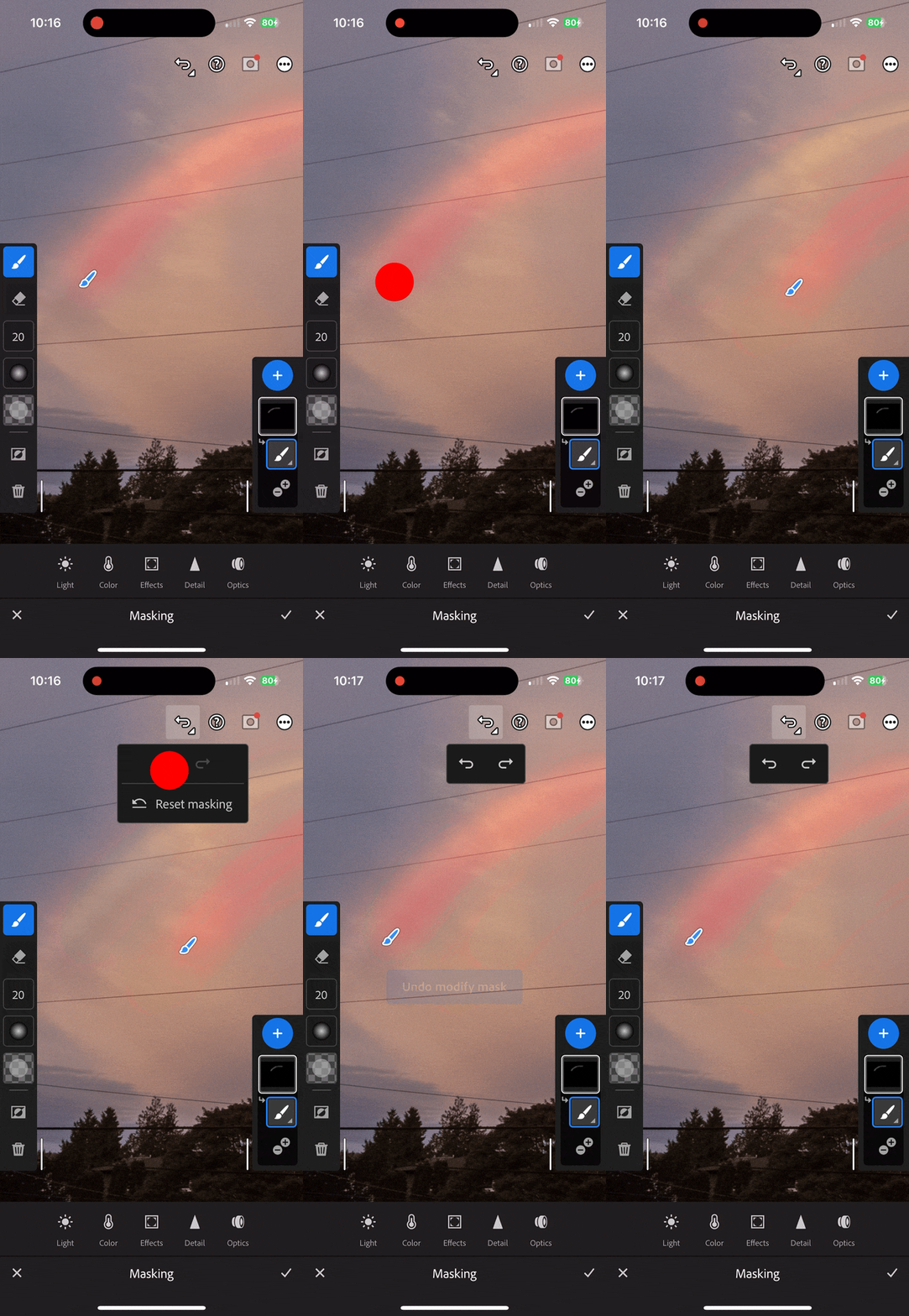
The demo below shows how to undo a brush mask move (or any other edit), although on an iPhone. On your phone, do you see the Undo/Redo buttons at the top of the screen as shown, or are you saying that the Android version of Lightroom does not have those?


2 replies

Conrad_C
Community Expert
Conrad_CCommunity ExpertCorrect answer
Community Expert
November 27, 2024

The demo below shows how to undo a brush mask move (or any other edit), although on an iPhone. On your phone, do you see the Undo/Redo buttons at the top of the screen as shown, or are you saying that the Android version of Lightroom does not have those?


Sameer K
Community Manager
Community Manager
November 27, 2024

Hey, @erin_5832. Welcome to the Lightroom Community. I'll help you figure this out. 


What specific masks are you working with? Subject & Sky masks don't move, whereas other Local adjustment masks can be moved and undo works for these masks. 

Please share a video of your workflow.


Thanks!

Sameer K

(Use '@mention' to tag me when you reply)

erin_5832Author
Participant
November 27, 2024
I use the brush mask tool. Also I don't know how to create screen
recordings on my android. Basically I use the brush tool to mask and If I
move the mask accidently, there's no way of undoing it and then I have to
start over. I use the brush tool for lighting and color corrections. I'm a
wedding photographer. And I like being able to edit on-the-go. It just
seems like a design flaw to have the brush mask be movable. Please try it
yourself so that you know what I mean. Make a mask and use the brush, maybe
brush over someone's face. And then move the mask. It makes no sense for it
to be movable.

On my laptop, if I accidently move it, I can simply undo it. Cmd z.

But not on my phone.