
runeh39431511
Known Participant
August 26, 2022
Frage

Not able to synchronize original photo, as only Smart Preview is in the cloud

  • August 26, 2022
  • 12 Antworten
  • 545 Ansichten

Hi

I'm not able to synchronize original photos to Lightroom, I know the location of the original and then try add this photo but it does not let me.


Here you can see that only smart preview is in the cloud.
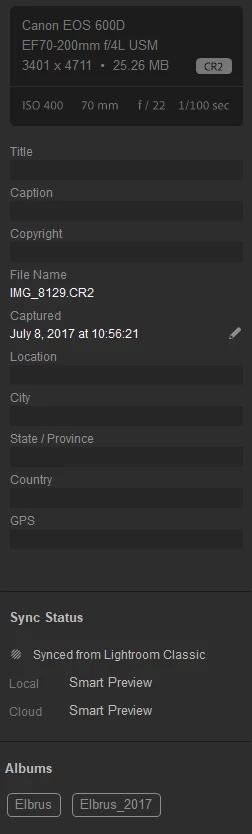
Next I try to import the original photo, but lightroom does not allow me to add the original.

 

This is very strange to me.... Anyone can help?


Dieses Thema wurde für Antworten geschlossen.

12 Antworten

Michael J. Hoffman
Community Expert
Community Expert
August 28, 2022

The original is on your desktop machine somewhere, referenced by the Lightroom Classic catalog that was used to upload the Smart Preview. Lightroom Classic does not upload original raw files. Do you have access to the main Lightroom Catalog that was used for syncing?


Using Lightroom Classic together with Lightroom )Cloud Based) requires a bit of advanced understanding about how and where your images are stored. In general, if you sync Lightroom Classic with Cloud Based, the originals all flow down to LR Classic, but not the reverse.


In your case, you may be trying to re-add the original to Lightroom Cloud, but Lightroom is recognizing that the image is already present in the catalog (on your desktop). Why are you trying to re-add the photo when it's already in the Library?


JohanElzenga
Community Expert
Community Expert
August 29, 2022

@Michael J. Hoffman I think you misunderstand what the OP wants to do and what should work just fine. If Lightroom Classic has synced a smart preview to the cloud, then you can replace that smart preview by the original by importing the original in Lightroom desktop. Lightroom desktop will recognise that this is the same photo and will replace the smart preview. You must use the same photo that Lightroom Classic has referenced, however. It cannot be a copy of that photo. Maybe that is what is going wrong here.


-- Johan W. Elzenga
runeh39431511
Known Participant
August 30, 2022

Hi

Thanks a lot for the feedback.

So I think I maybe have found out what is going wrong here.(So far only confirmed with 2photos) It seems that the photos is duplicated, and only one photo is located in the organized album. The other photo only availbale when I search in "All Photos" 

So then I guess the solution would possibly be, it will be quite a bit of work as I think it is 1000-1500photos.

  • In each album -> Filter by 'Synced from Lightroom Classic'
  • Note down the filename of all these photos
  • Search for these photos
  • Add these photos into the album
  • Confirm you now see duplicated inside the album
  • Filter again 'Synced from Lightroom Classic'
  • Delete these photos which is not fullsize

Do you think I'm on to something here?