
Answered
Not Backed Up, Corrupt original
I try to sync my raw files with the cloud, but every time I get a message that says "Not Backed Up, Corrupt original". I can open every every file that seems to be corrupt without any problems via Mac Finder and also work with them in Lightroom CC, but it won't sync with the cloud.
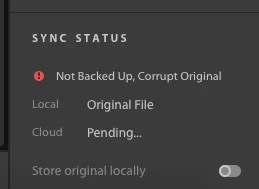
I already updated Lightroom cc to version 1.2 and I tried to solve it with the known issues https://helpx.adobe.com/lightroom-cc/kb/known-issues.html#SyncingLightroomphotos
I also have done a lot of work on my picture and I don't want to waste that time. Is there any way to fix these issue? The Raw files are on a external disk, connected to the Macbook.
Best regards,
Florian


 AdChoices