
Participant
October 18, 2017
해결됨

Online storage with full CC subscription?

  • October 18, 2017
  • 18 답변들
  • 27954 조회

Hi,

The new Lightroom CC storage plan includes 1 TB of storage for $9.99/mo (or $19.99 when paired with Photoshop in the Photography plan). As a full Creative Cloud subscriber, will my storage increase to 1 TB or am I stuck with 100 GB? If I want to upgrade the storage for an additional fee, is this possible?

I realize the product just launched but there is a lack of clarity on the website about how these updates affect existing subscribers...

Thanks.
이 주제는 답변이 닫혔습니다.
최고의 답변: zselmon

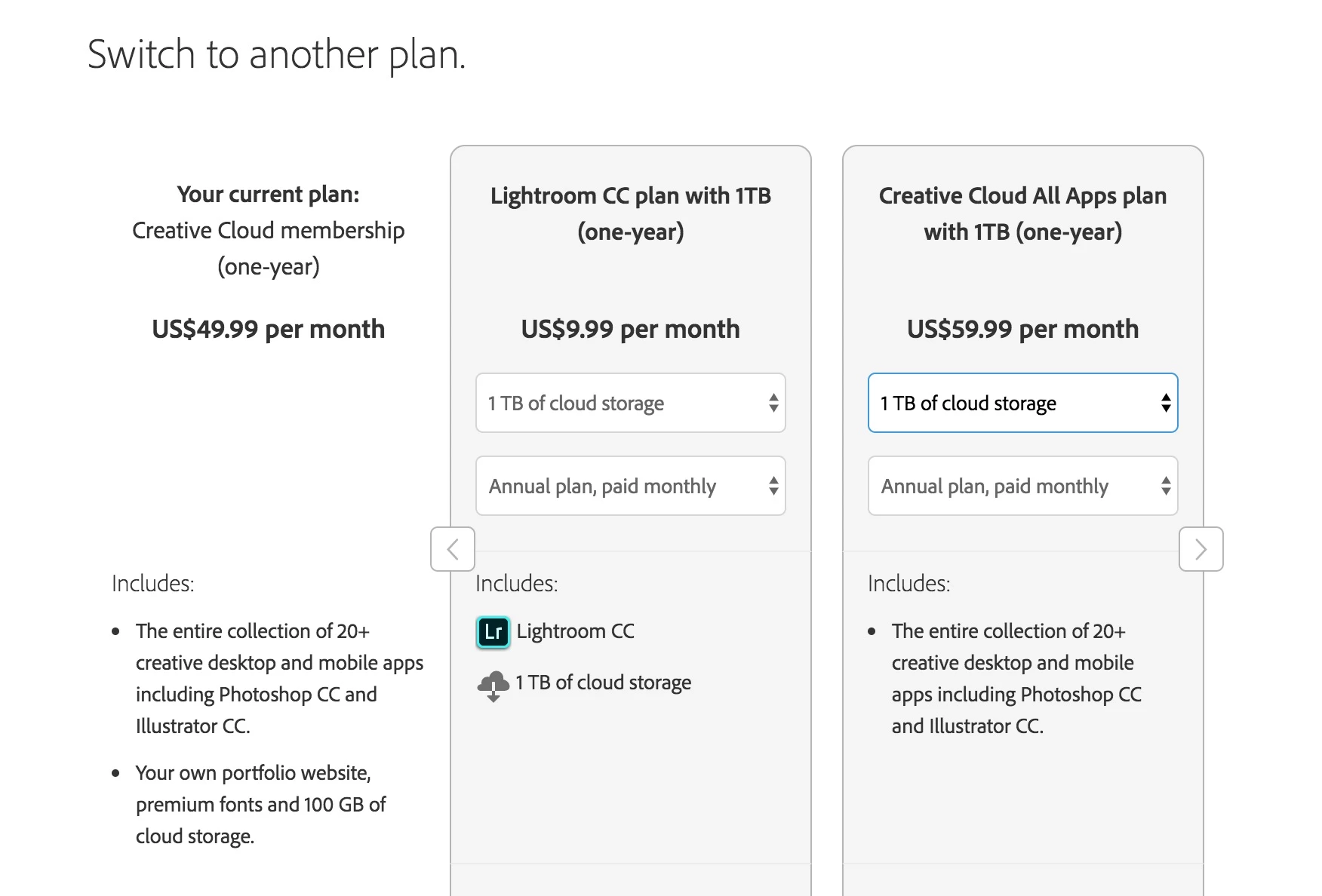
I have the option to switch plans and increase storage under my full creative cloud account... If i go to switch plans, click the little right arrow, this is what I see

18 답변

GhostHost999
Participant
July 7, 2018

Can someone explain to me why upgrading to 1TB of storage would cost $40/month more on a first year Student/teacher edition or $30 more if you are in your second year. I can buy lightroom CC for $10/month with 1TB under a separate account, but to upgrade and existing account one must pay a massive premium. After a miserably long 3rd Chat attempt with Adobe I was told it is impossible to have two different licenses (one Lightroom CC and One S/T edition full CC) on the same account, and that to upgrade the storage to the full Student/Teacher CC subscription the only option is to pay $59. This is the dumbest pricing scheme I have ever seen.

Rick Spaulding -
Legend
October 24, 2017

So... under the "best laid plans of mice and men" category the path to getting an upgrade in storage to certain plans has been rocky at best. Let me start by thanking all of you for your persistence and patience in searching for a solution to this issue. Also, on behalf of everyone at Adobe I would like to offer a sincere apology. Our teams are working rabidly... ferociously... furiously... (yeah that's it )

...working furiously to create a smoother experience for our customers. Until then...

We are trying to discourage people from using that 1tb link I mentioned in the thread because it only adds CC storage, not photo storage so if you would please not use it that would be helpful.

We are asking you to simply purchase the stand alone Lightroom CC w/ 1TB plan for $9.99. It's less messy for your account and it get's you your storage for the same price. It's not the most elegant solution but until the team figures out a better one it will work.

Another alternative is to wait until your current plan runs up against your storage limit. You will then receive a notification that should present you with the appropriate upgrade options.

If other issues arise please respond to this thread and we will deal with them. This is a perfect example of users helping to make the product experience better for everyone.

Thank you!

Rick

Known Participant
October 24, 2017

Rick

re:

Another alternative is to wait until your current plan runs up against your storage limit. You will then receive a notification that should present you with the appropriate upgrade options.

That’s what I did and it did not present appropriate upgrade options. See my earlier post with screen grab. You have to go to Add Plan and choose from there.

Known Participant
October 20, 2017

It's fixed! Hooray!

But please fix this situation for everyone else as well. It's really quite a fiasco, and I'm sure you don't want everyone to have to go through all this hassle.

Rick Spaulding
Participating Frequently
October 20, 2017

I'm so sorry you've had such a confusing experience! We are working hard to find a simpler path.

In the mean time, thank you for any amount of patience you can give and thanks for all the fantastic feedback.

Rick

kusteiker
Participating Frequently
October 20, 2017

Yeah, also managed to purchase 1TB storage as instructed by Adobe, but Lightroom CC still just shows 100GB.

Participant
October 20, 2017

I am also stuck at 105GB, not the full 1TB. I am more than a little miffed. I migrated an old full catalog but removed it, but I have no way of removing the 20K photos from the cloud,  Why is there no cloud sync editing. I have multiple catalogs and would just like a mobile one living in Lightroom CC. I will stick with Lightroom Classic for my photography needs. Not a great way to treat a CC Full subscriber since day 1. Not pleased right now. Get your act together Adobe. I have paid a significant amount to you over the years.

Participant
October 20, 2017

It is interesting that prices vary so much from one country to another. 

I am in Australia and still using the same Adobe servers.  

Just like apple we pay twice the price to purchase the same apps & music form the same app store !

It took 6 hours of preparing the downloading/Syncing 35,000 photos to the new Adobe Lightroom CC on my desktop machine and also preparing the Catalog on Lightroom Classic CC.

I have also upgraded to the 1TB plan. 

I could then commence to migrate the photos to the cloud.  

I have a 100mbs Download and 20mbs upload internet connection.

It is still going to take 2-3 weeks for the photos to upload !  

It has uploaded around 10gb (1,000 frames) in 9 hours or so. 

I am not against change however it is very frustrating that no notice was given to users to prepare for a few weeks of disruption in setting this all up and to allow time to learn the new systems and workflows etc. 

Inspiring
October 20, 2017

I'm sorry for hijacking this post, but at the moment the 100gb for Lightroom and the 100gb from Creative Cloud files are separated right? I have different usage quotas on both...

Can someone please clarify? Because if the photos and the files uses the same 100gb, I will have to buy 1TB very quickly.

Known Participant
October 20, 2017

Same 100GB if I understand your question correctly.

Known Participant
October 19, 2017

thomasnash​ I'm not going to risk it. I only have one shot to migrate my old Lightroom Catalog. I need to be 100% sure it's going to work.

Known Participant
October 20, 2017

Agree! Don’t migrate!

You can use the Add Photos button (+ sign upper left) to add whole folders and put them into "Albums". I was suggesting you use this to add more than 100GB and see if you are allowed and have the TB allocation. In fact I think this is a much more controlled way to do a migration than in one big automatic shot.

I am presently adding enough files to exceed my 100GB allocation to see what happens. It first copies the files to its own storage area and then starts syncing and backing up. That doubles local storage at first, but after full cloud backup it will delete some files not in active use. I need to keep using Classic because too much is missing in CC, but I want to have mobile access. Changes do seem to appear in both programs after you make them in one.

I am pretty sure that if you later do a full migration, it will simply incorporate any photos you have already added.

EDIT Added at 640PM PDT:

My added photos import finished and the synching continued until it got to 105GB when it stopped with a big red warning that I needed to upgrade. That included a link to upgrade which took me to a place where there was no option to increase storage. The message "Add storage by upgrading to the new Photography plan." appeared without that option showing --- and anyway I am on a complete CC package. 

I hope someone at Adobe is reading this thread. There needs to be simple options show for adding storage to an existing plan so one is sure that it will be properly integrated.

Known Participant
October 19, 2017

I have tried restarting Lightroom. I have also tried completely logging out of creative cloud and logging in again. I have tried on desktop and mobile. I still only have 100GB of storage even though I am now paying $10 extra per month for 1TB. It has been over 5 hours since I gave them money, and I have not received anything in return. I expected it to be instantaneous. Doesn't really give you a lot of confidence that they will be a safe place for backups. I'll probably also keep paying for Google Drive because clearly Adobe can't be trusted.

Also, they aren't really placing a premium price on storage. The storage prices are $10/TB/month, which is competitive with other cloud providers. The thing is they have completely messed up the organization of plans, ability to manage plans.

What they should have done with the announcement of Lightroom CC is upgrade every single existing plan to have 1TB minimum, since 100GB is now a useless amount of storage. Then just allow people to upgrade their storage to any amount (for a price) at any time, regardless of their plan.

Known Participant
October 19, 2017

I think this is a screw up in the launch, but it is really a PITA, particularly since the Help agents have no clue.

I was about to buy a TB plan, but I will wait until I am sure it would be integrated into LRCC. Please keep us informed.

I still have not heard back from the "Senior Agents"

Known Participant
October 19, 2017

Update: I bought the 1TB plan for $10 a month. It went through. I have it on my account. But in Lightroom, it still says I only have 100GB of storage available.

Known Participant
October 19, 2017

Have you tried to restart LR CC? Have you retried again after a while, maybe there is a delay before it shows up in LRCC?

If this works properly it is a good clean way of solving this problem.

After 1/2 hr wait time, and 20 minutes of chat, I was told that it is impossible to add memory to a Student and Teacher edition all Creative Cloud Edition. I told them this made a product I had paid for useless and finally got the case escalated. I will report back when I get the email from the Senior Agents answering this question.

Participating Frequently
October 19, 2017

Yes.  that is the situation i'm in.  You can switch plans, but then you aren't getting the student/teacher edition any longer, but rather the full priced edition for almost twice the price.  it is odd they have placed such premium price on storage, especially since their new approach by definition demands a lot more of it.

Known Participant
October 19, 2017

I was finally able to get a real answer! You can upgrade your storage to 1TB using this link:

****This is Rick Spaulding.  Just to be clear, I had to delete the link that was in this post because it did not work. It added 1TB of Creative Cloud assets storage but not photo storage. If you should encounter this "Adobe Checkout" link elsewhere, don't use it. The issue has been fixed and you should be able to purchase more storage through your "Manage Account" link as described above.*****

Cheers!

Participant
October 19, 2017

Literally, this one post is more helpful than 2 of the adobe support people, and 10 minutes of back and forth.