Participant
Aug 26, 2024 10:39 PM UTC
Answered

original picture

after i edit a picture, the original is gone, how can i keep the original so i can edit 3 options from the same picture? for example a crop, a black and white, and a vignette?

This topic is closed to new replies. Start a new post to keep the conversation going.
Rob_Cullen
Rob_CullenCorrect answer
Community Expert
Aug 27, 2024 1:27 AM UTC

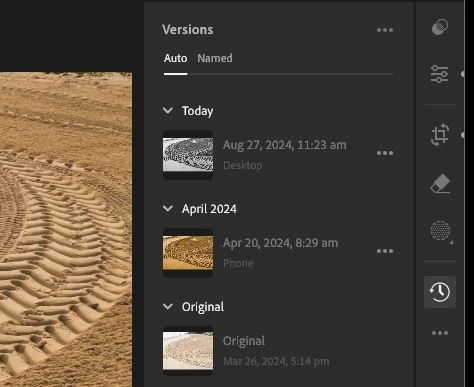
The image you 'see' on screen is always an interpretation of your original unchanged photo. To create other versions in Lr 7.5-

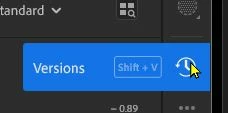
Click on the 'Clock' icon to create Versions which can be independently edited.

Regards. My System: Windows-11, Lightroom-Classic 15.6, Photoshop 27.8, ACR 18.7, Lightroom 9.4, Lr-iOS 10.4.0, Bridge 16.0.3 .

1 reply

Rob_Cullen
Community Expert
Rob_CullenCommunity ExpertCorrect answer
Community Expert
Aug 27, 2024 1:27 AM UTC

The image you 'see' on screen is always an interpretation of your original unchanged photo. To create other versions in Lr 7.5-

Click on the 'Clock' icon to create Versions which can be independently edited.

Translate
Regards. My System: Windows-11, Lightroom-Classic 15.6, Photoshop 27.8, ACR 18.7, Lightroom 9.4, Lr-iOS 10.4.0, Bridge 16.0.3 .