
P: Can't find Enhance Features after update (LrD)
Bug Report – “Denoise” Option Missing After Update
Description:
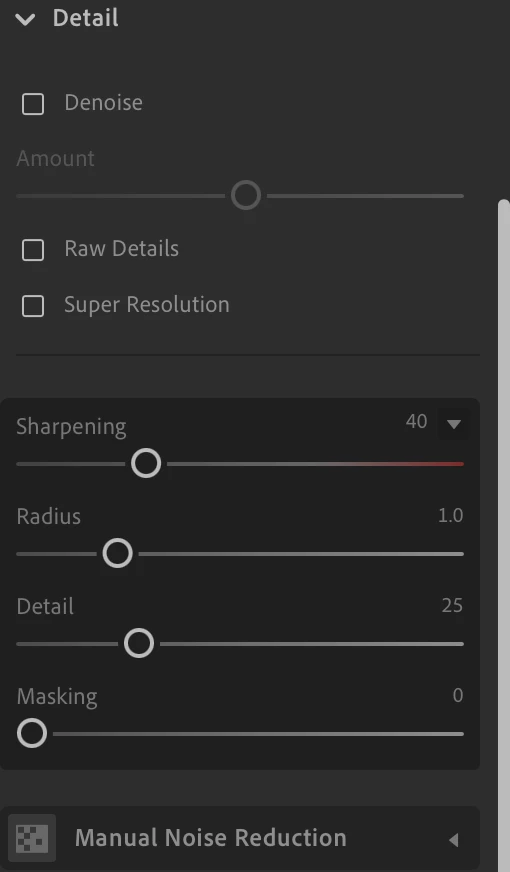
After updating Lightroom to version 8.4 arm64 [20250603-0500-10f89fb] (June 2, 2025) on macOS, the Denoisefeature is no longer available. The option that previously appeared under the Detail panel in the Edit module has disappeared completely.
This feature was working prior to the update.
Steps to Reproduce:
-
Open Lightroom version 8.4 on macOS 15.5.
-
Import or open any RAW image.
-
Go to the Edit panel → Detail section.
-
Attempt to use the Denoise function (previously available in the top right corner of the Detail panel).
-
The Denoise option is missing.
Expected Behavior:
The Denoise (AI) feature should be available for supported RAW files, as it was before the update.
Actual Behavior:
The Denoise option is no longer visible or accessible.
System Info:
-
Lightroom Version: 8.4 arm64 [20250603-0500-10f89fb]
-
macOS Version: macOS 15.5 (24F74)
-
Hardware: Mac mini (Macmini9,1), Apple M1, 16 GB RAM
-
Displays: 1920x1200 + 2560x1440
-
Graphics: Metal: Apple M1 – Loaded and supported
Camera Raw Version: 17.4 [2271]
Internal Libraries:
-
NGL: 1.41.0.11
-
WF: 7.4 a9dfbad
-
VF: 1.0.154
-
HIL: 40501
-
CAI: c2pa-c/0.6.0 c2pa-rs/0.46.0
-
PH: 5.2.3
Notes:
-
The issue persists across different RAW files.
-
The GPU is correctly detected and shows no issues.
-
Reinstalling Lightroom did not resolve the issue.
-
The feature was available prior to the update to 8.4.


 AdChoices