
carloss22072637
Known Participant
May 21, 2024
Question

P: Lightroom 7.3 permissions issues

  • May 21, 2024
  • 2 replies
  • 1729 views

Hello, 


I just updated to Lightroom 7.3 and now everytime I open the app it shows a error message saying it has detected folder permissions: 
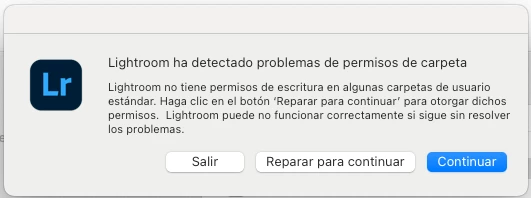
 

I click "repair to continue" but it can't repair the issue and throws another message: 
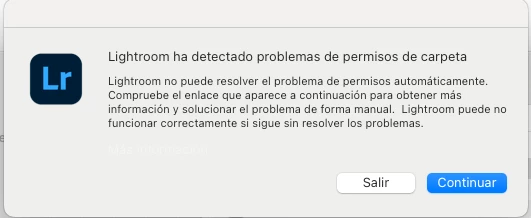


If I click continue it opens and seems to work fine, but the error is really annoying. 


I unistalled and reinstalled the whole thing but didn't fix the issue.  


Any help? 


This topic has been closed for replies.

2 replies

Participant
June 16, 2024

I ran into the same issue after upgrading to Lr 7.3.  I located the following thread which describes a similar issue (with Lr Classic) and solution, which worked for me.

https://community.adobe.com/t5/lightroom-classic-discussions/permissions-lightroom-does-not-have-write-permission-to-some-standard-user-folders/m-p/11132063


"Try the followingopen up terminal.app (type terminal in the looking glass top right in the menubar)


type (just copy and paste):


diskutil resetUserPermissions / `id -u`


This will take a while and will reset the permissions in your home folder. Might fix your problem."

Rikk Flohr_Photography
Community Manager
May 21, 2024

You may try resetting your preference file to see if the recurring message goes away. 


This procedure works for both Lightroom Classic and Lightroom Desktop.

If you are using Lightroom Desktop, it can change your local storage location. Please review this setting after resetting preferences. 


Reset Procedure:

1. Close Lightroom.

2. Hold down [Alt/Opt]+[Shift] while restarting Lightroom.

3. Overwrite the Preferences when prompted by the dialog.

4. Close Lightroom.

5. Restart Lightroom.

Note: a preference file survives an install/uninstall. 


Rikk Flohr: Adobe Photography Org
KCB56
Known Participant
May 22, 2024

I have the exact same issue as reported from the beginning of this thread.

I reverted back to LR 7.2 and the issue went away.  Reinstalled the update to 7.3 and the issue came back and persists.

I just went through the procedure to reset Preferences and that did not resolve the issue.


Mac OS 12.7.4