

defaultdadpflohkyor
Participant
June 22, 2026

P: LrD v9.4 on macOS crashes, or does not launch

  • June 22, 2026
  • 4 replies
  • 45 views

I’m trying to open the Lightroom desktop app on a 2021 Macbook Pro. It looks as if the app starts to open, but then crashes immediately. I’ve tried restarting my laptop, uninstalling and reinstalling lightroom, and signing out/signing back into the Adobe Creative Cloud app. I’m still able to access other Adobe products on the laptop, it’s just Lightroom itself that’s unable to open. I can’t provide any screenshots, since the app itself won’t open. 


It’s not Lightroom Classic, but the new Lightroom app. 
    Pinned Reply By Sameer K

    Hi All! We are aware of a crash issue with Lightroom v9.4 caused by permissions problems in macOS folders. Please follow the steps provided here to manually resolve the permissions issues affecting Lightroom's directories: http://www.adobe.com/go/lr_user_permission_issue 

    If it does not help, please upload & share the Lr Console log by following these steps on macOS:

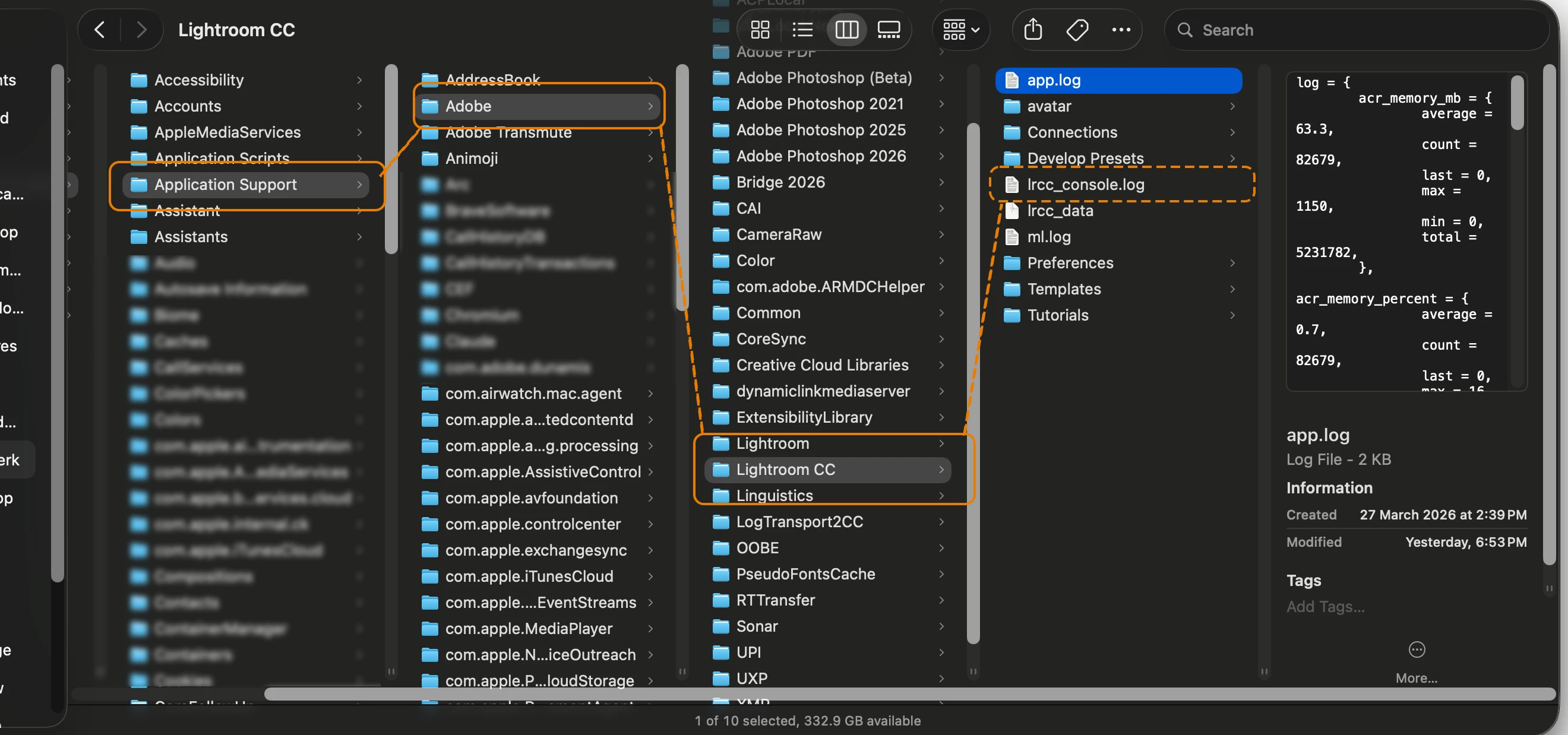
    • Hold down the Option key in the Finder when using the Go menu. The Library will appear below the current user's home directory.
    • Library > Application Support > Lightroom CC > lrcc_console.log


    Let us know how it goes. Thanks!
    Sameer K


    4 replies

    Sameer K
    Community Manager
    Community Manager
    June 26, 2026

    Hi All! We are aware of a crash issue with Lightroom v9.4 caused by permissions problems in macOS folders. Please follow the steps provided here to manually resolve the permissions issues affecting Lightroom's directories: http://www.adobe.com/go/lr_user_permission_issue 

    If it does not help, please upload & share the Lr Console log by following these steps on macOS:

    • Hold down the Option key in the Finder when using the Go menu. The Library will appear below the current user's home directory.
    • Library > Application Support > Lightroom CC > lrcc_console.log


    Let us know how it goes. Thanks!
    Sameer K


    Participant
    June 24, 2026

    Same here with 9.4, reverting to 9.3 makes it work again, but after upgrading to 9.4 it fails again.

    Turns out the problem for me was the previously benign file permissions issue that Lr always complained about but could never repair even though I clicked repair every time.  I manually went to 

    /Users/[user name]/Library/Logs/ and added read/write permission for my user and this went away and now 9.4 works

    Community Expert
    June 23, 2026
    My System: Intel i7-8700K - 64GB RAM - NVidia Geforce RTX 3060 - Windows 11 Pro 25H2 -- LR-Classic 15 - Photoshop 27 - Nik Collection 9 - PureRAW 6 - Topaz Photo AI
    Sameer K
    Community Manager
    Community Manager
    June 23, 2026

    Rikk is away for a few days. Done! 

    anthonys86363473
    Participant
    June 23, 2026

    same issue here