
Participating Frequently
February 23, 2022
Answered

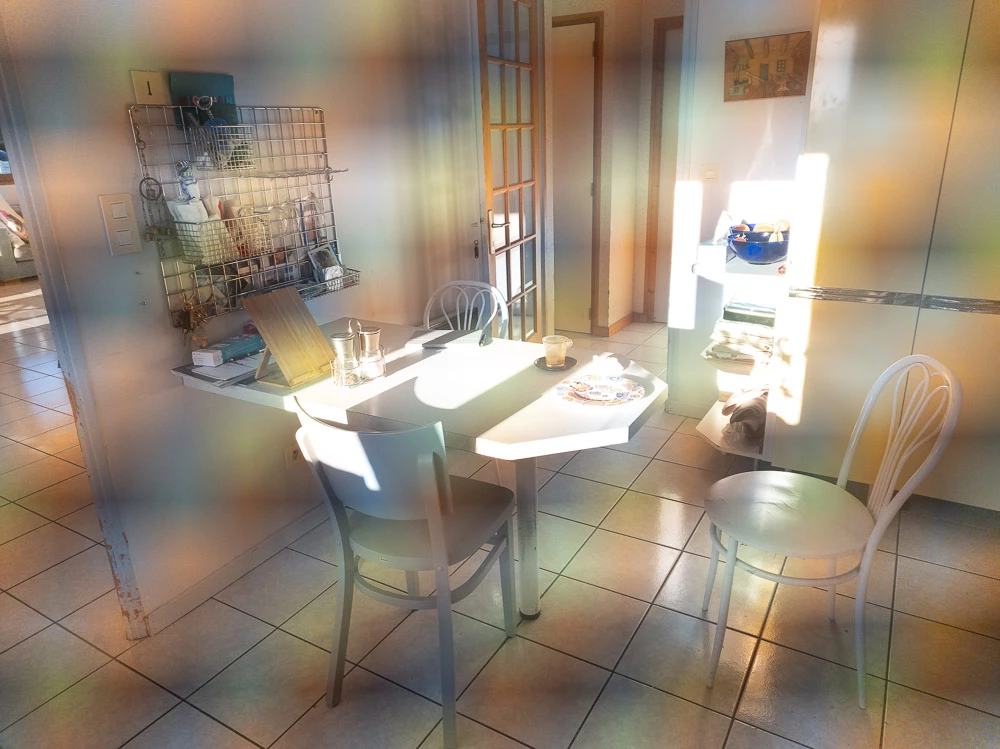
P: Samsung S22 Ultra exhibits unusual color pattern due to malformed metadata in file

  • February 23, 2022
  • 32 replies
  • 15545 views

I just got a new Samsung Galaxy S22 Ultra phone and installed the latest Lightroom Mobile (LRM). All the DNG RAW photos I take with the LRM camera  are unusable because they come out with bands of rainbow colour all over them.  The angle of the bands varies between photos.  JPG files from the LRM camera are OK.   JPG or DNG photos taken with the default Samsung camera are OK.  Is this a bug that will be fixed in Lightroom Mobile?   

Interestingly, the Lightroom Mobile DNG files look fine when viewed in the Microsoft Windows Photos app on my PC - but not in any Lightroom app (including Lightroom Classic, Lightroom Web)! 

I cannot attach an example because this site says the content type does not match its DNG extension but here is a JPG exported from the DNG in Lightroom Classic which shows the problem.
My old Samsung Galaxy Note 9 did not have this problem.

This topic has been closed for replies.
Correct answer Rikk Flohr_Photography

Settings status from Started to Investigating. We've received sample files - thank you. 
After evaluating, we've forwarded our findings to Samsung for further evaluation. 

32 replies

Participant
July 11, 2022

I noticed the same problem last week when I tried a s22U with third-party apps. I made a video with some examples for your reference. 
https://youtu.be/lUXgIrzHZjw


Inspiring
May 3, 2022

Investigating for two months now...

Participant
May 3, 2022

I'm having a similar issue. 


Photos I take using the preinstalled camera app on my s22 once in lightroom end up out of balance and too bright, its not an issue for photos taken on other devices or saved/downloaded.

roverdublin
Inspiring
April 21, 2022
Ja, das ist ein Problem in der Lightroom Kamera. Es wurde bereits als Bug
den Entwicklern bekannt gegeben.
Ich hoffe Sie arbeiten an einer Lösung.
Participant
April 21, 2022

Hi liebe Community,

habe ein Problem mit meinem neuen Samsung Galaxy S22 Ultra in Verbindung mit Lightroom Mobile.

Habe bei egal welcher Verschlusszeit, Blende, ISO-Wert ein Regenbogen Muster über dem Bild liegen (siehe Anhang).

Handy hat keine Hülle und Linsen sind sauber.


Kämpft jemand mit einem ähnlichen Problem und lassen sich die Bilder noch retten ?


Danke für Eure Tipps & Hilfe!


Nobby

Known Participant
April 11, 2022

Hey @Rikk Flohr: Photography - I don't agree that my post should be merged with this thread.

  • This thread is about a bug with the Lightroom Mobile camera.
  • My report is about the way that Lightroom (LR Mobile and LR on desktop) display photos taken with the stock Samsung camera (esp. those in HEIC format).


Can you please separate them?


Thanks. 

Known Participant
April 11, 2022

I have a Samsung Galaxy S22 Ultra (Android 12).

Lightroom Mobile v7.2.1.


  • I take photos on the phone with the stock Samsung Camera app (v 12.0.01.62) in normal as well as PRO modes, and also Samsung's Expert RAW app (v 1.0.01.1).
  • The photos are generally in HEIC format, but I also use RAW (DNG) and JPEG.
  • The issues described below are found with the HEIC photos, not DNG or JPG.
  • I import photos to Adobe Lightroom Mobile on the phone.
  • The photos as displayed in the stock Samsung gallery look 'correct' / as expected.
  • When they are displayed in the LR Mobile gallery they are too bright and also appear to be the wrong colour balance.
  • When I open an HEIC image from the LR Mobile gallery the image then 'resolves' and matches the way it looks in the stock Samsung gallery (i.e. 'correctly'). This does not then translate back to the gallery view - the image still looks wrong in that view.
  • Moving to the Windows PC and Lightroom (v5.2), the photos' appearance matches that seen in LR Mobile - i.e. too bright and the wrong colour balance when displayed in the film strip.
  • When opened to a single image view the image 'resolves' after 3-5 seconds and then looks correct.
  • The images in the film strip remain incorrect.
  • In LR Classic (synchronised via LR Mobile's albums) the photos look correct in both the gallery and individual formats as soon as they are opened.


I hope that is enough information but if you require more let me know.  I have not included any examples or screenshots as I am not sure how useful they would be when the issue is one of rendering, but will do so if requested.


Known Participant
April 10, 2022

I have just checked this - I don't usually use the LR camera - and discovered the same issue.

I have the Exynos (UK) variant.

Happy to add any further information or help with testing bug fixes if required.


roverdublin
Inspiring
April 8, 2022

I got a new Samsung S22+ . When I use my Lightroom Camera the pictures are not usable. A color Moiré makes the pictures look awful. The build in camera app and the new Expert RAW app are creating proper pictures in RAW format.  Can you please address this problem as soon as possible?  I use this new phone camera with Lightroom for my customers.


This is a sample picture:


roverdublin
Inspiring
April 6, 2022

I have the same problems with the pictures from Lighroom Camera.

The new Expert RAW and the build in camera are OK.

I have the Exynos Xclipse 920 in my S22+ (Ireland)