
Participating Frequently
February 23, 2022
Answered

P: Samsung S22 Ultra exhibits unusual color pattern due to malformed metadata in file

  • February 23, 2022
  • 32 replies
  • 15545 views

I just got a new Samsung Galaxy S22 Ultra phone and installed the latest Lightroom Mobile (LRM). All the DNG RAW photos I take with the LRM camera  are unusable because they come out with bands of rainbow colour all over them.  The angle of the bands varies between photos.  JPG files from the LRM camera are OK.   JPG or DNG photos taken with the default Samsung camera are OK.  Is this a bug that will be fixed in Lightroom Mobile?   

Interestingly, the Lightroom Mobile DNG files look fine when viewed in the Microsoft Windows Photos app on my PC - but not in any Lightroom app (including Lightroom Classic, Lightroom Web)! 

I cannot attach an example because this site says the content type does not match its DNG extension but here is a JPG exported from the DNG in Lightroom Classic which shows the problem.
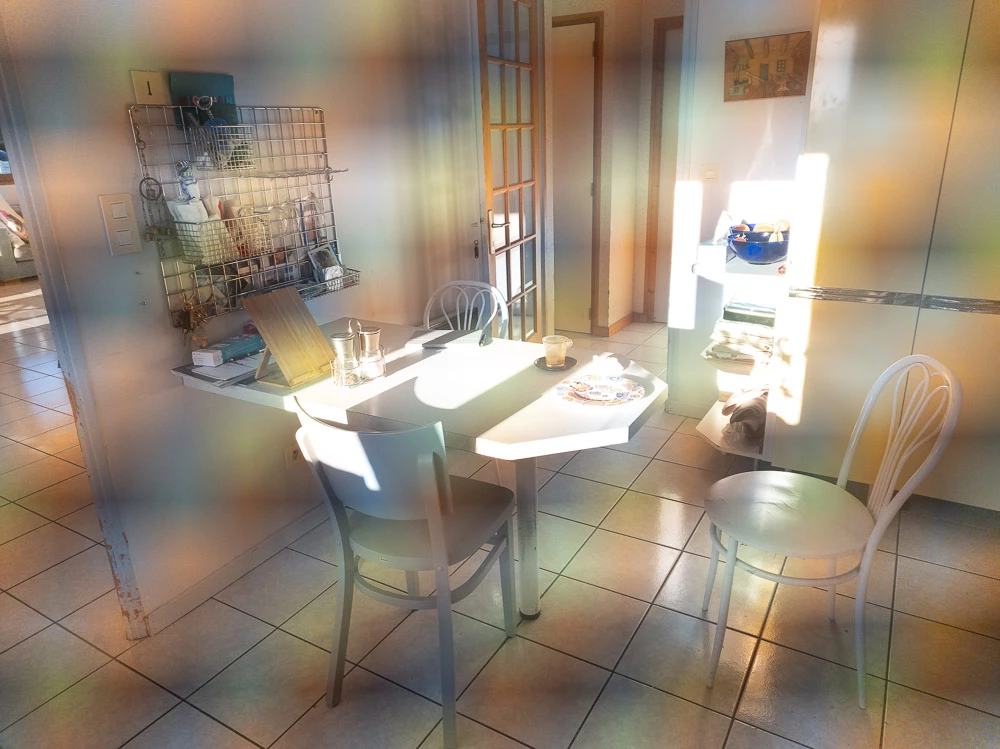
My old Samsung Galaxy Note 9 did not have this problem.

This topic has been closed for replies.
Correct answer Rikk Flohr_Photography

Settings status from Started to Investigating. We've received sample files - thank you. 
After evaluating, we've forwarded our findings to Samsung for further evaluation. 

32 replies

Participant
February 24, 2022

I have the exact same problem.

It's the same i both Automatic, Pro and HDR.
App ver 7.2.1 (Arm8) Android 12


As the other metinoned: This is not a problem in the camera app folowwing the S22. Not if i shot i Pro mod and get dng files. The jpg fra PS Camera is also OK. The suggestet plastic covering the lenses should ha created this effect regaring of camera in use.

(Is the plastic covering all lenses? I havn't removed anything from the lens front and are not able to do i either.) 

jojogiltsoff
Adobe Employee
Adobe Employee
February 23, 2022

Hi there, as there are many lenses on the new Samsung S22 Ultra, can you check that all of these have had all plastic covering removed?

Participating Frequently
February 23, 2022

Hello, I have looked closely at all the lenses and cannot see any plastic film. I also tried taking the same photo by just switching from the DNG to JPG option in the Lightroom camera which seems to always use the same lens.  The two photos had the same frame but the JPG photo was OK and the DNG showed the coloured banding.   [As a side remark, the Lightroom camera would have much more potential and interest if it allowed me to choose among the available lenses on this phone - perhaps the Adobe engineers coudl think about that ... ]

jose manuel jara
Participant
July 20, 2022

The problem is that this is a Samsung problem.

If it were an Apple problem, it would have been fixed months ago...