Participant
June 18, 2025
Answered

Paramètres photo ne s'appliquent plus

  • June 18, 2025
  • 1 reply
  • 313 views

Bonjour,

Je rencontre depuis une heure environ un problème, je travaille sur un Windows 11 x64 et sur Lightroom web , les modifications que j'effectue sur mes photos ne s'enregistrent, j'ai tenté de changé de navigateur, mais ça persiste (Brave -> Chrome)


Correct answer Sameer K

Bonjour,

Je parlais de cet espace de stockage, j'ai eu l'impression qu'en le vidant cela avait amélioré les performances, cela est-il lié ?
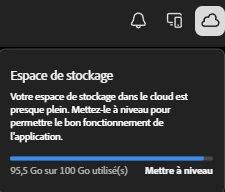


Hey, @Dreamtim_photos. Thanks for the screenshots & we're sorry for the delay in getting back to you.


The screenshot shows the cloud storage quota in your subscription. It does not affect the Lightroom's performance on your device.

In Lightroom's context, upon 100% usage, sync will pause and any new imports and edits will remain stored locally and won't be backed up on the cloud. 


You can learn more about what services use the cloud storage in your account: https://adobe.ly/40HIOo1;


I hope this helps. Thanks! 

Sameer K

(Type '@' and type my name to mention me when you reply)

1 reply

Srishti_Bali
Legend
June 18, 2025

Hi @Dreamtim_photos


Thanks for reaching out! I noticed the Save button is grayed out, this could possibly be a network-related issue. Could you try switching to a different network (like a mobile hotspot) or using another device to see if the issue still occurs?

A few quick questions to help us troubleshoot better:

  • Which operating system are you using?

  • Are your edits showing up on the image but not saving, or are the edits not applying at all?

  • Did this issue start after a recent update?


Let us know — happy to help you get this sorted!


Regards,

Srishti

Participant
June 18, 2025

Hello,


This is Windows 11 Home Family

The changes appear but aren't saved

This problem occurred today


I tried rebooting my internet box, but the problem persisted


I noticed that I was at 88% of my storage capacity. I deleted some photos to get it down to 81%, and it's been working again. I don't know if there's a connection, but the changes are now possible again

Thank you for your feedback

MassC
Legend
June 27, 2025

Hey @Dreamtim_photos


Glad to hear you were able to resolve the issue! Just to clarify—what did you mean by “deleting storage capacity”? If the issue comes up again, try making sure your browser is up to date and clear the cache, as that can often help.


^CM