
Participant
August 10, 2024
Question

Photos w Lens Blur won't export?

  • August 10, 2024
  • 7 replies
  • 1410 views

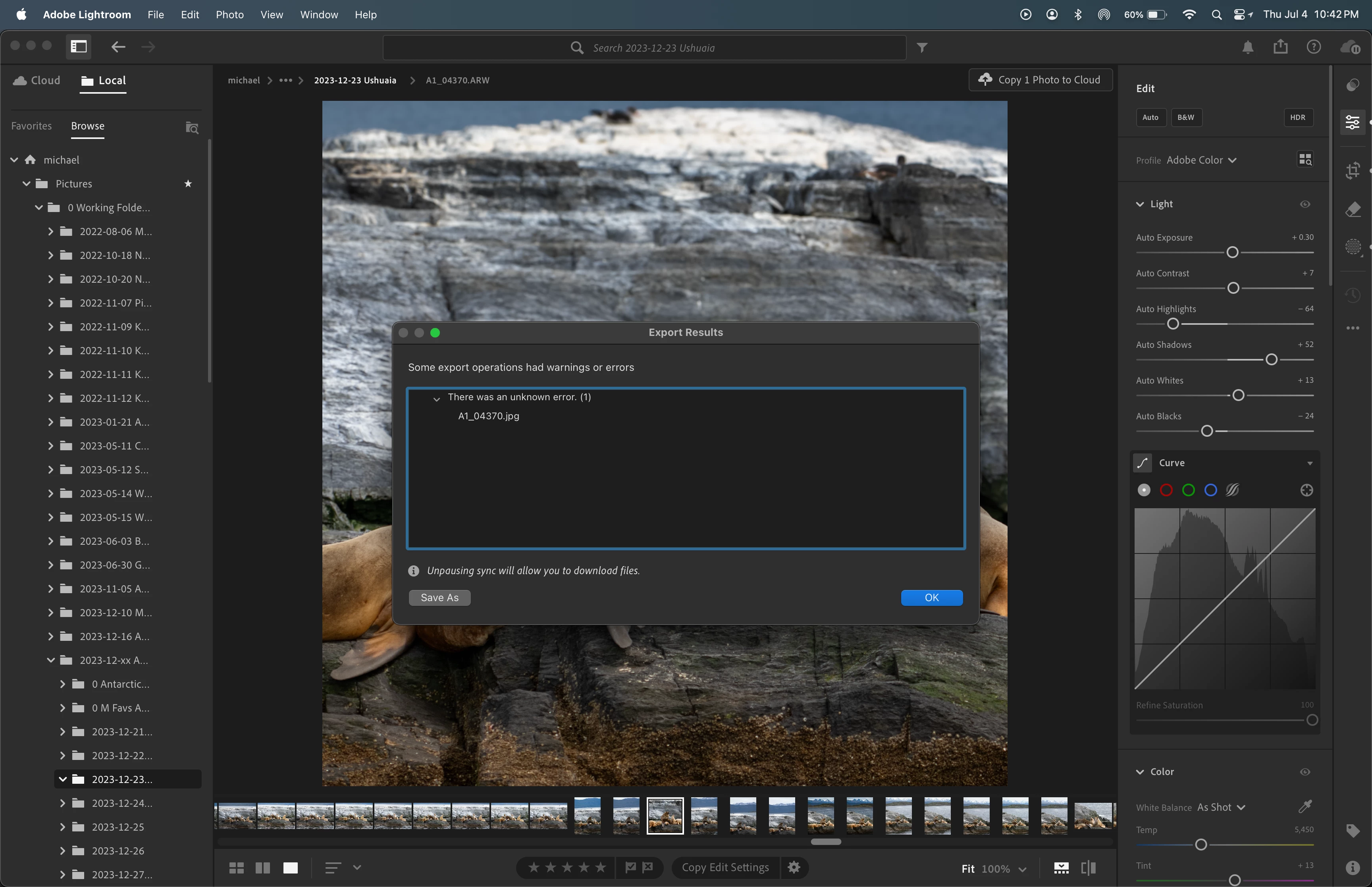
Hmm, when I apply Lens Blur, I can't locally export my edited photo. I can export (1) before I apply Lens Blur and (2) after I remove Lens Blur. Just not with Lens Blur. This wasn't the case before LR 7.4.1.


I'm using Lightroom 7.4.1 (not Lightroom Classic) on a MacBook Pro on MacOS 14.6.1. Attached is the error message that I get. It was only with trial and error did I isolate the problem to Lens Blurred photos. Anyone have any ideas? Thanks in advance.


This topic has been closed for replies.

7 replies

Ta Sin
Participant
February 4, 2026

Blur not apply my photo

Participant
June 30, 2025

Commenting on this thread for an easier solution, but it's an issue with exporting via JPEGs for some reason. It occurs both in LrC and LR. I tried exporting to PNG 16-bit and it worked well. While the size is massive, you can open up GIMP to convert it back into a JPEG. Or just export as an 8-bit PNG. Hope this helps. Adobe should fix this bug. 

Participant
June 5, 2025

Just commenting to help any future users:


Yes, lens blur can prevent exporting your files from Lightroom Classic. I could not publish some of my photos to Pixieset, nor could I export them to my computer. Why? No idea, it's an 'unknown error.' Was Adobe support helpful in resolving my issue? No. They just kept giving me generic direction on how to export a file. Ridiculous. Even after I stated, 'hey, I came across a support thread that says lens blur seems to be the problem, how do I export after using this feature?' Wild. 


I followed the solution below, open your files with lens blur in photoshop. Make an edit, then save it back to lightroom (Go to File, then click save. It will save as a tif file, which I believe flattens the edits made in lightroom). Then export these new .tif files as you would normally. Voila, problem solved. 

Participating Frequently
May 12, 2025

I found that in order to get lens blur to work with export through Lightroom, you would have to export the image into Photoshop, do a minor adjustment (or no adjustment <- not sure this is accurate though), then bring it back into the Lightroom program to apply the lens blur onto the tiff/jpg and export. Let me now if that was helpful or works for you..

Participating Frequently
May 12, 2025

minor adjustment - duplicate image and merge together (crtl/cmnd + E), then import back into lightroom. should work with lens blur and export after.

Participant
April 13, 2025

Still getting this error 8 months later. Now on MacOS 15.3.2 Sequoia, Lightroom 8.0.

Participant
April 13, 2025

Just updated to Lightroom 8.2, still same error.

Participant
March 7, 2025

I'm having the same issue. Unknown error whenever I try to export from my catalogue, which resides on an external SSD, to my hard drive, running Sequoia 15.3.1. "Updating" to Sequoia was the worst thing I've ever done.  Had to turn off Content Credentials to get any exports to work, can't export anything with lens blur applied, and airdrop only works by having 2 Finder windows open and dragging the files I want to airdrop from one window to the other.

Participant
March 7, 2025

Also, I get an error message when I try to edit in PS, but it does open in PS. Let's see if I can export from there...


That worked. Edit in PS and the Save for Web from there. Glad I don't often use lens blur!

Participant
August 11, 2024

Hmm, when I apply Lens Blur, I can't locally export my edited photo. I can export (1) before I apply Lens Blur and (2) after I remove Lens Blur. Just not with Lens Blur. This wasn't the case before LR 7.4.1.


I'm using Lightroom 7.4.1 (not Lightroom Classic) on a MacBook Pro on MacOS 14.6.1. Attached is the error message that I get. It was only with trial and error did I isolate the problem to Lens Blurred photos. Anyone have any ideas? Thanks in advance.


[moved from bugs to discusssiuons according to the community rules - Mod.]


[Duplicate post: https://community.adobe.com/t5/lightroom-ecosystem-cloud-based-discussions/photos-w-lens-blur-won-t-export/td-p/14792583]

Participant
September 1, 2024

01 September 2024: I'm experiencing the same problem in LR Classic. Any images with "Lens Blur" modifications cannot be exported. MAC Sonoma 14.6 + LR Classic 13.4.