
dong59613834
Participating Frequently
August 30, 2025
Answered

Please just open the photo. Not helpful to just say: previously added

  • August 30, 2025
  • 1 reply
  • 99 views

Please change Lightroom CC so that it simply opens the photo if it's been through Lightroom previously.

Fantastic that you developers use only the Lightroom library to navigate your photo history.  Many other users have their own project-based filesystems in native operating systems like Windows.

Many other Lightroom users ... you know, your PAID SUBSCRIBERS ... simply double-click to open a file. It's a fundamental expectation of computers that double-click opens a default application.  For example, Lightroom as default editor of photos.

If you double click a photo you've previously edited, then all Lightroom will do is say: Previously Added.  Which is NOT HELPFUL.  Just open the file.

Why would a user re-edit a file? To crop differently. To mix the color and light different to request. These are routine tasks.

When Lightroom says only Previous Added, now the user has to navigate the Lightroom Library.  What day was this photo edited? Dunno off hand, have to research.  Okay, found the date.  And there's HUNDREDS of other other photos now to paw through on that date in the Lightroom Library.

It's a frigging waste of user time to research and search the Lightroom Library.

JUST OPEN THE FILE!

Lightroom knows where the file is in its Library. JUST OPEN THE FILE!'

Thank you. 
Correct answer Rob_Cullen

As another user of the Lightroom-Desktop app might I make suggestions?

You cannot " open from Windows file system or Adobe Bridge with a double-click...."

Lightroom is an unconventional app that uses a Cloud based catalog library, and a [double-click] will only ask you to Import an image to the Library (Which you can only do once!). "Lightroom" should not be marked as the default app to open image files of any type (this fixes it!).


As for finding an image in the Lr libtrary interface that has been previously imported, and continue editing- I suggest you make a "Working" ALBUM that you can add the photos you are currently wanting to work on, hence easily found by selecting the Album. You can have >1 Album in a Folder for several categories of photos (eg. client jobs). Or use the Keyword facility to rapidly find images with a keyword.


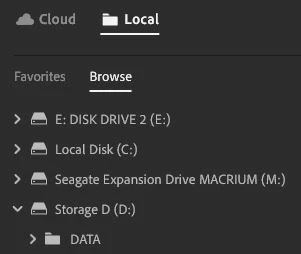
OTOH There is the 'Local' mode in Lightroom where a simple browser interface allows you to select a local image on a connected drive to edit in Lr.


1 reply

dong59613834
Participating Frequently
September 15, 2025

It is astounding that after TWO YEARS of complaining that Lightroom should JUST OPEN A FILE that has been previously edited, you still haven't fixed this.

It is an enormous waste of time that all that happens when you try to open a file that you edited before in Lightroom is a message: Previously Added.

Open the file either by double-clicking on it so that it opens in Lightroom. Drag-drop to Lightroom from the Windows filesystem. Or selecting File->Open from Windows filesystem.  Either of these: Previously Added.

JUST OPEN THE FILE!

The file was edited months, years ago. All I want to do is adjust the color the more, or crop.

Lightroom knows where the file is in its library. JUST OPEN THE FILE!

What happens instead is I now have to figure out the date of the photo. Navigate into the terrible User Interface of the Lightroom Library, and paw through maybe HUNDREDS of files from that date to find the right one.

Such a waste of time navigating the Lightroom Library. JUST OPEN THE FILE.  It's a fundamental user expectation that files tagged to Adobe Applications JUST OPEN when you click on them.  Premiere Pro files. After Effects files. All of these open from Windows file system or Adobe Bridge with a double-click.

Except Lightroom tagged as default editor for JPG.

It's so easy. Double-click. Open in Lightroom as adjust a previous edit.  NOT AT ALL HELPFUL to just display a message: Previously added.

FIX THIS!

Rob_Cullen
Community Expert
Rob_CullenCommunity ExpertCorrect answer
Community Expert
September 16, 2025

As another user of the Lightroom-Desktop app might I make suggestions?

You cannot " open from Windows file system or Adobe Bridge with a double-click...."

Lightroom is an unconventional app that uses a Cloud based catalog library, and a [double-click] will only ask you to Import an image to the Library (Which you can only do once!). "Lightroom" should not be marked as the default app to open image files of any type (this fixes it!).


As for finding an image in the Lr libtrary interface that has been previously imported, and continue editing- I suggest you make a "Working" ALBUM that you can add the photos you are currently wanting to work on, hence easily found by selecting the Album. You can have >1 Album in a Folder for several categories of photos (eg. client jobs). Or use the Keyword facility to rapidly find images with a keyword.


OTOH There is the 'Local' mode in Lightroom where a simple browser interface allows you to select a local image on a connected drive to edit in Lr.


Regards. My System: Windows-11, Lightroom-Classic 15.1.1, Photoshop 27.3.1, ACR 18.1.1, Lightroom 9.0, Lr-iOS 10.4.0, Bridge 16.0.2 .