Participant
October 22, 2021
Answered

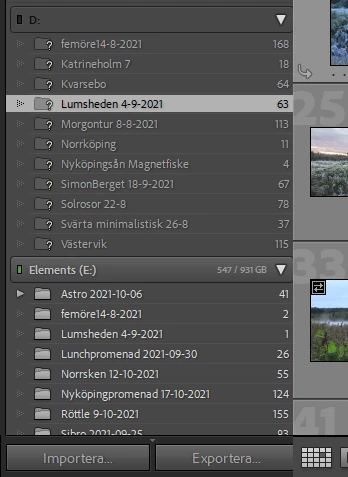
Portable drive issues, cant find previously imported files

  • October 22, 2021
  • 4 replies
  • 392 views

Hi, I have a small issue. I import all my photos from a portable drive inte Lightroom. When I used it at home it gave me the letter 😧
When I inserted the drive at my office it gave me the letter E:

Now my previously imported photos are stuck in 😧 and greyed out with a ?mark and if I try to edit them it just say: Cannot find file. I need to somehow move the files to the E: how do I do this?
If I re-import them I will lose all my edits?
This topic has been closed for replies.
Correct answer Jim Wilde

Correct, you would lose edits if you re-imported, so you don't want to do that. The solution is to simply relink LrC to the "missing" folders, using the instructions in this document: https://www.lightroomqueen.com/lightroom-photos-missing-fix/

4 replies

Inspiring
October 22, 2021

I'd just change the drive letter on the office computer back to D.  Faster & easier than relinking.  If you're going to continue moving the portable drive between home & office, you'll defintely want to set the letter to be the same in both places to avoid the problem going forward. 

Microsoft Docs: Change a drive letter 

Jim Wilde
Community Expert
Jim WildeCommunity ExpertCorrect answer
Community Expert
October 22, 2021

Correct, you would lose edits if you re-imported, so you don't want to do that. The solution is to simply relink LrC to the "missing" folders, using the instructions in this document: https://www.lightroomqueen.com/lightroom-photos-missing-fix/

Participant
October 24, 2021

Thanks Jim, this was very helpful, marked this as answer!

JP Hess
Inspiring
October 22, 2021

This is the Lightroom Ecosystem forum. You are more likely to get assistance in the Lightroom Classic forum.

Participant
October 22, 2021

I see now that D : gave an emoji instead of the actual letter number.