Participant
October 31, 2020
Question

Post install update

  • October 31, 2020
  • 2 replies
  • 228 views

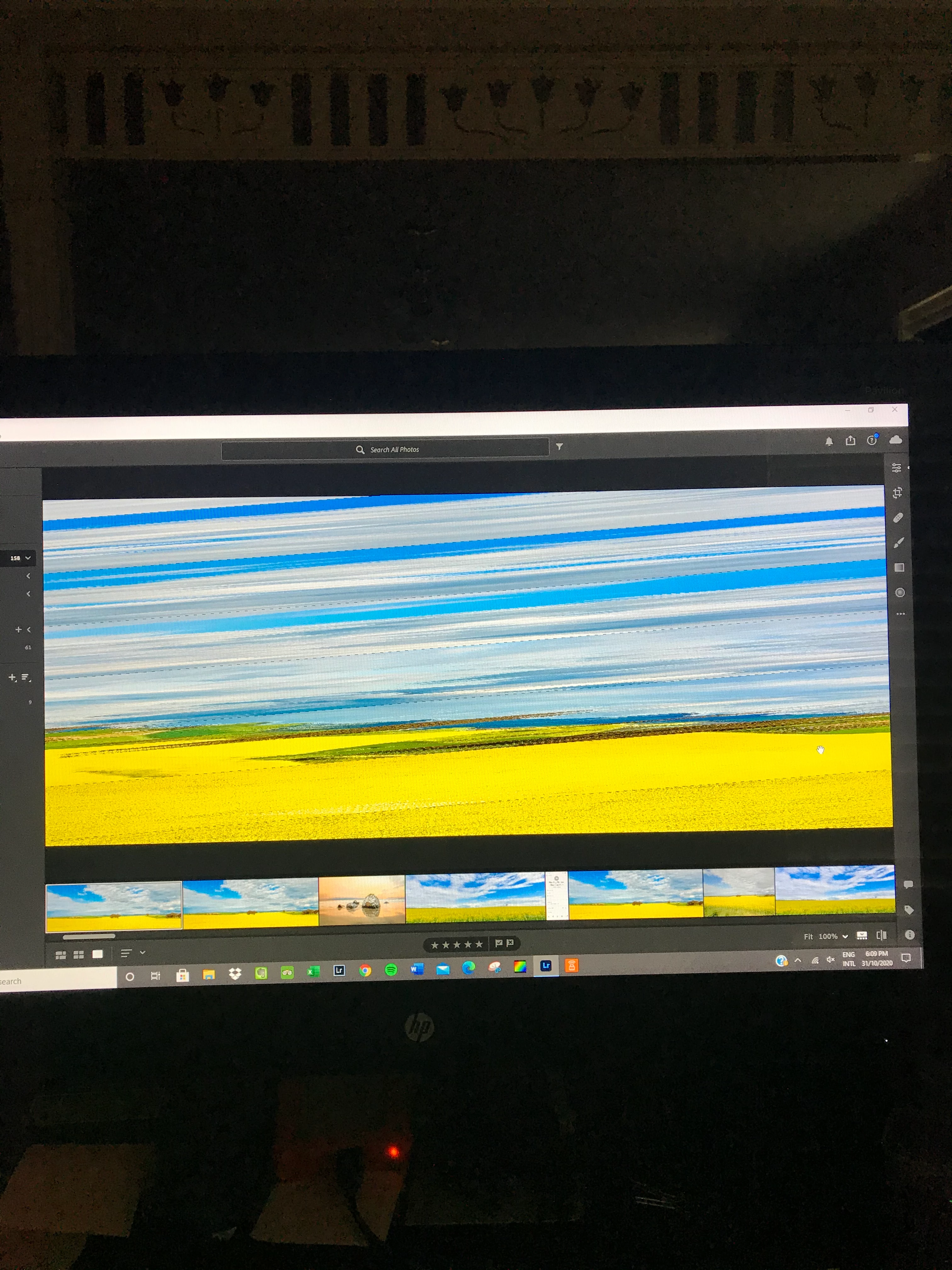
I updated Lr today. There is a problem with the photo editing screen. The photo to be edited is obscured. Why did this happen? 
This topic has been closed for replies.

2 replies

Just Shoot Me
Legend
October 31, 2020

Since you seem to advertise Photography for beginners I suggest you learn how to take proper Screen Shots with the Tools to do so in both OS X and Windows.

Instead of using a camera to take a picture of your screen. Then you can pass that knowledge on to whoever comes to you for Photography lessons.

D Fosse
Community Expert
Community Expert
October 31, 2020

That's a buggy video driver. A new Lightroom version may place new calls to the driver, exposing latent bugs.


In the meantime, until you get a new driver, uncheck GPU in Lightroom preferences.

D Fosse
Community Expert
Community Expert
October 31, 2020

(I see this must be the cloud-based version of Lightroom, which I don't use. This is the Lightroom Classic forum. But I assume the principles are the same).

harry5C8BAuthor
Participant
October 31, 2020

Thanks. I was able to chat with someone from Adobe who’s fixed it. 👍--
Edited by Moderator.
