
Eljay80
Participant
December 7, 2020
Answered

Problem with Programm Menu
  • December 7, 2020
  • 2 replies
  • 550 views


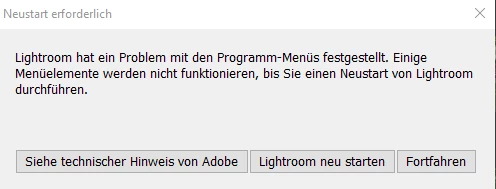
Pls see the screenshot. This error comes every 5-10 minutes in lightroom cc . the creative cloud app says the cc version is the newest.


Restart doesn't work. I have got this problem on two different windows 10 machines.

Is there a known bug?

This topic has been closed for replies.
Correct answer Eljay80

i found a solution. Very weird Problem:


I found out that in the information was shown: there are 39.990 Pictures in 7456 albums. (!!!!)

Well, i did not made 7456 albums! In the sidbar there where shown only about 40 albums.

So I logged online in lightroom.adobe.com and there i found a lot of albums called:


m100_01

m100_02

m100_03 .. and so on.

M100 is one of my Canon Cameras. The albums were under "Migrated from..." Area.

After that I deleted the albums. And know everything is working fine.

2 replies

GoldingD
Legend
December 10, 2020

In Lightroom, click on Help, what do the first 5 lines state?

Copy, and post


Eljay80
Eljay80Author
Participant
December 10, 2020

thx!


as mentioned above, the problem is solved by deleting 7450 albums in the "Migration from" section...


if you mean the systeminformation at help section:

lightroom-Version: 4.1 x64 [ 20201120-1311-17d302b ] (Nov 23 2020)
NGL-Version: 1.22.1.3
WF-Version: 3.1 2fd01ab
Betriebssystem: Windows 10
Betriebssystemversion: Windows 10 Pro (2009)
Anwendungsarchitektur: x64
Systemarchitektur: x64
Computermodell: Micro-Star International Co., Ltd. MS-7A38 / AMD Ryzen 5 2600 Six-Core Processor
Anzahl logischer Prozessoren: 12
Prozessorgeschwindigkeit: 3,4 GHz
Integrierter Speicher: 32719,1 MB
Für Lightroom verfügbarer phys. Speicher: 32719,1 MB
Von Lightroom verwendeter phys. Speicher: 305,9 MB (0,9%)
Von Lightroom verwendeter virtueller Speicher: 278,5 MB
Cache-Speichergröße: 0,0 MB
Interne Camera Raw-Version: 13.1 [ 658 ]
Maximale Anzahl Threads, die Camera Raw verwendet: 7
Camera Raw SIMD-Optimierung: SSE2,AVX,AVX2
Virtueller Speicher in Camera Raw: 0MB / 16359MB (0%)
Physischer Speicher in Camera Raw: 0MB / 32719MB (0%)
DPI-Einstellung des Systems: 96 DPI
Desktop-Komposition aktiviert: Ja
Monitore/Anzeigegeräte: 1) 1920x1080
Eingabetypen: Multitouch: Nein, integrierte Toucheingabe: Nein, integrierter Stift: Nein, externe Toucheingabe: Nein, externer Stift: Nein, Tastatur: Nein

Informationen zum Grafikprozessor: DirectX: Radeon RX 580 Series (27.20.14501.24001) - 8 GB
Grafikprozessordaten: geladen: Ja, unterstützt: Ja, Computing: Ja, Init.: I4_GPU3, Hardware: success, Software: success, WL: Ja, BL: Nein
Medienfähigkeit des Betriebssystems: true

Eljay80
Eljay80Author
Participant
December 8, 2020


this problem still exists after the update (today to 4.1).

Eljay80
Eljay80AuthorCorrect answer
Participant
December 9, 2020

i found a solution. Very weird Problem:


I found out that in the information was shown: there are 39.990 Pictures in 7456 albums. (!!!!)

Well, i did not made 7456 albums! In the sidbar there where shown only about 40 albums.

So I logged online in lightroom.adobe.com and there i found a lot of albums called:


m100_01

m100_02

m100_03 .. and so on.

M100 is one of my Canon Cameras. The albums were under "Migrated from..." Area.

After that I deleted the albums. And know everything is working fine.