Participant
April 23, 2025
Answered

Replace background in LR?

  • April 23, 2025
  • 1 reply
  • 606 views

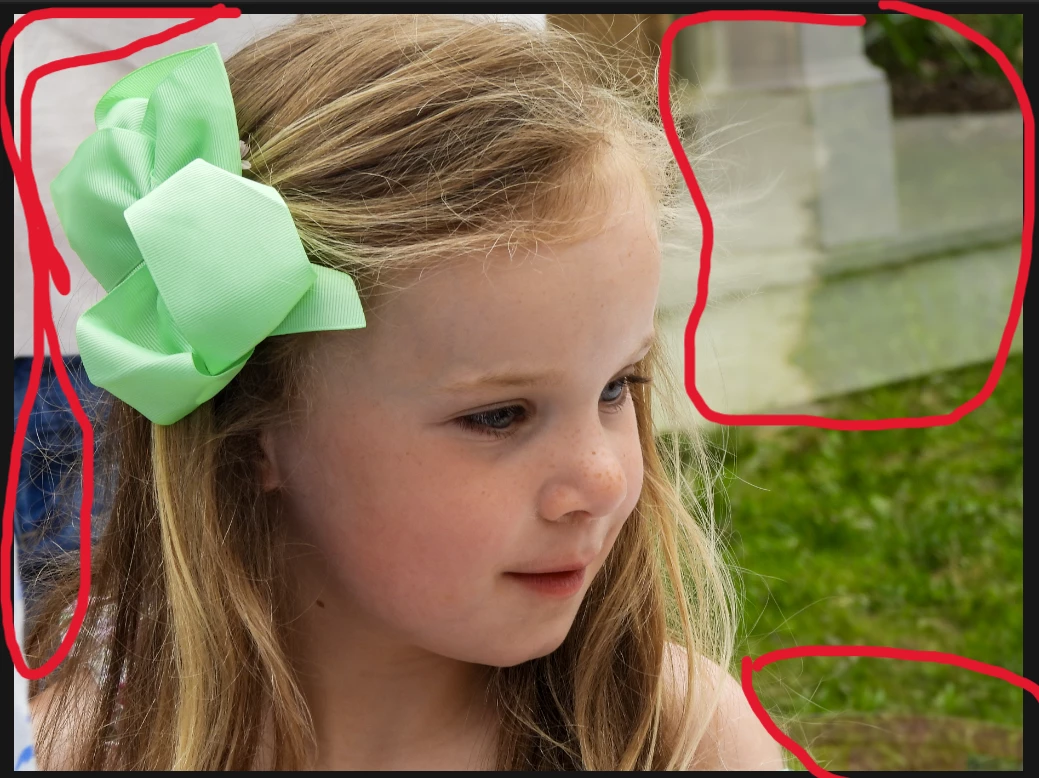
New to LR - I can't figure out how to replace the red circled area with the grass. 

I feel like this should be very easy but I can't see how to do this. 
Correct answer MassC

Hey @heidi_5077

Here’s a helpful article that walks you through how to use Generative Remove in Lightroom Classic:
https://adobe.ly/3RtsAKt


And if you’re more of a video tutorial person (like me!), check this one out:
https://adobe.ly/3RzPyzz

Hope that helps!


^CM

1 reply

Community Manager
April 23, 2025

Hi @heidi_5077! Welcome to the community! 😊


You can try using the Clone tool to replicate the grass pattern in the circled areas.

Alternatively, you can use the Generative Remove tool on the circled areas to fill them with generated content.

It's not perfect, but in this quick example, I used both. The Clone tool to add grass to the circled areas, then used Generative Remove on those same areas to give it a more consistent look.

Hope this helps!

Alek


*(If you mention me with an @, like @Aleke, I’ll get a notification and can respond faster.)*
Participant
April 23, 2025

Your version looks great but I can't get it to look like that. I'm not sure what the steps are. When I try, I get ghost-like images from other parts of the photo. Sorry for being inept but can you give me the steps? Or direct me to the instructions that are easy to read?

MassC
MassCCorrect answer
Legend
April 23, 2025

Hey @heidi_5077

Here’s a helpful article that walks you through how to use Generative Remove in Lightroom Classic:
https://adobe.ly/3RtsAKt


And if you’re more of a video tutorial person (like me!), check this one out:
https://adobe.ly/3RzPyzz

Hope that helps!


^CM
