
Inspiring
July 1, 2020
Answered

Restoring a deleted image from trash to LR, on a Mac?

  • July 1, 2020
  • 3 replies
  • 422 views

Hi Guys,

I guess the title says it all.


I dragged the deleted image to a folder on my Desktop but when I try to Import it from LR, my Desktop appears as empty. Not sure why or what to do next.


Thanks a lot,


Raphael
This topic has been closed for replies.
Correct answer JohanElzenga

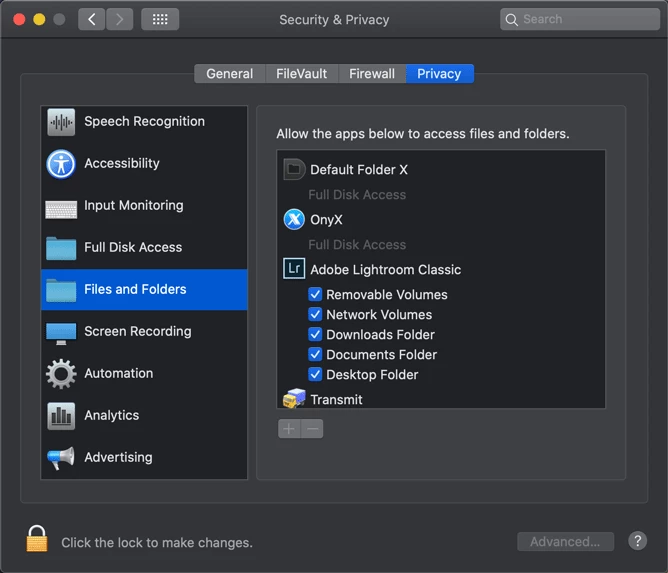
If you use MacOS Catalina, then make sure that Lightroom has permission to access the desktop folder.

3 replies

Inspiring
July 1, 2020

Thank you 99jon. Yes, Classic.


I entered the filename into the Library Filter under Text > Filename, and nothing came up.

JohanElzenga
Community Expert
JohanElzengaCommunity ExpertCorrect answer
Community Expert
July 1, 2020

If you use MacOS Catalina, then make sure that Lightroom has permission to access the desktop folder.

-- Johan W. Elzenga
Inspiring
July 1, 2020

Wow Johan, like magic!

Thanks so much.

99jon
Legend
July 1, 2020

Are you using Lr Classic? Could the imgae still be in the catalog?

Try searching in Lighroom for the file name and if found re-connect it.