
K4D1N
Participant
March 23, 2026
Question

Show original tool half hidden

  • March 23, 2026
  • 1 reply
  • 21 views

This has been a bug for a few versions now, but when the edit panel is open the (Show Original) button on the bottom panel under the filmstrip half gets covered,
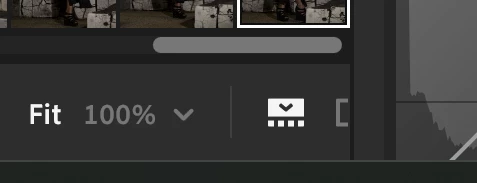


It looks like a half square that has been cut off by the edit panel. instead of condensing it all it now covers when it can make items on the panel under the film strip, which can be frustrating when trying to edit.

    1 reply

    nikunj.m
    Legend
    March 26, 2026

    Hi, thanks for reaching out! I’m not seeing this with the latest version of Lightroom (9.2).

    Please go to the Help menu in Lightroom, then System Info, and copy the text. You can share the info with us by either pasting it as a reply here or in a text file and sharing the file with us.  

    Do you have a dual monitor setup up? If yes, what’s the resolution of the monitor you’re using the application on? 


    Waiting for the additional information to help figure this out. 

    Thanks, 

    Nikunj 

    K4D1N
    K4D1NAuthor
    Participant
    March 29, 2026

    Lightroom version: 9.2 x64 [ 20260217-0314-dfbaf86 ] (Feb 16 2026)
    NGL Version: 1.42.0.5
    WF Version: 8.2 5e8f3ad
    VF Version: 1.0.164
    HIL Version: 40501
    CAI Version: c2pa-c/0.6.0 c2pa-rs/0.46.0
    PH Version: 5.2.3
    Adobe GSDK Version: Unknown
    CR Version: 29.0.0.202506270808_710830c

    Operating system: Windows 11
    OS Version: Windows 11 Pro (2009)
    Application architecture: x64
    System architecture: x64
    Computer model: ASUSTeK COMPUTER INC. Zenbook UX8402VU_UX8402VU / 13th Gen Intel(R) Core(TM) i9-13900H
    Logical processor count: 20
    Processor speed: 2.9 GHz
    Real memory available to Lightroom: 32373.4 MB
    Real memory used by Lightroom: 1105.5 MB (3.4%)
    Virtual memory used by Lightroom: 1318.3 MB
    Memory cache size: 640.2 MB

    Internal Camera Raw version: 18.2 [ 2482 ]
    Maximum thread count used by Camera Raw: 11
    Camera Raw SIMD optimization: SSE2,AVX,AVX2
    Camera Raw virtual memory: 0MB / 14138MB (0%)

    Displays: 1) 2880x1800, 2) 2880x864
    System DPI setting: 192 DPI (high DPI mode)
    Dark Mode: No
    Desktop composition enabled: Yes
    Input types: Multitouch: Yes, Integrated touch: Yes, Integrated pen: Yes, External touch: No, External pen: No, Keyboard: No

    Graphics Processor Info: DirectX: NVIDIA GeForce RTX 4050 Laptop GPU (32.0.15.6607) - 6 GB
    Graphics Processor Detail: loaded: Yes, supported: Yes, compute: Yes, init: I4_GPU3, hard: success, soft: success, al: Yes, dl: No
    OS Media Capability: true

    Application Folder: C:\Program Files\Adobe\Adobe Lightroom CC
    Settings Folder: C:\Users\______\AppData\Roaming\Adobe\Lightroom CC
    Library Folder: C:\Users\______\AppData\Local\Adobe\Lightroom CC\Data

    This is the system INFO from my lightroom, I have a special laptop with a 2nd monitor inbuilt, but I run Lightroom on Display 1 as it’s OLED, I think it's just something to do with the resolution and some of the setting in the bar no longer compacting with similar when you open more left and right panels.

    Sameer K
    Community Manager
    Community Manager
    April 3, 2026

    Hey, ​@K4D1N. This could stem from the dual-display configuration on your machine. It’ll be difficult to recreate this; however, in the machines I tested, I couldn’t recreate this from the get-go. 

    Could you also record your screen and the sequence of steps that trigger the UI change?


    Thanks!
    Sameer K