
Sort by filename doesn't match short cut filename sort order in Windows 10 File Explorer
I'm brand new to Lightroom (I'm using the Creative Cloud version). I want to create a slideshow of about 200 photos that I have in local files on my Windows machine. As part of selecting the photos I created a folder with short cuts pointing to the original photos, with short cut names choosen to give the proper sort order (the file name dates were munged by previous import operations, long story)
I imported the short cut photos into Lightroom, but when I sort by date using the sort menu at the bottom of the browsing window, like this:
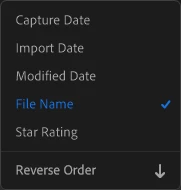
The order of the photos is different from how they are displayed in the short cut Windows File Explorer, (when sorted by short cut name).
I can't seem to show what Lightroom thinks the filename is for a photo, but I'm guessing Lightroom decided to ignore the short cut filename and use the underlying physical filename instead.
Any ideas about how to import and sort by short cut name?
A typical short cut name is "000_DSC_0105.jpg - Shortcut" which points to DSC_0105.jpg in another directory.
Thanks in advance
Ben
 AdChoices